
An HTTP 304 status code helps browsers and crawlers validate cached resources without downloading the complete response again. It is not an SEO error, and it does not directly improve or damage your Google rankings.
Imagine Googlebot visits your website today, crawls an article, and stores a copy of it. A few days later, Googlebot visits the same URL again.
Your server checks whether the page has changed. If nothing has changed, it tells Googlebot that they already have the latest version. It doesn’t need to download the entire page again.
That’s what an HTTP 304 Not Modified response does.
However, there is an important technical SEO detail: a 304 response is only useful when your server correctly determines that the requested resource has not changed.
If your caching rules, ETag, Last-Modified headers or content-update process are configured incorrectly, Googlebot may continue receiving outdated content.
And that’s where HTTP 304 can become an SEO problem.
What happens when Googlebot receives a 304 Status Code?
Google has explained how its crawlers handle a 304 Not Modified response in its official documentation.
Google generally supports two HTTP request headers for checking whether content has changed:
If-Modified-SinceIf-None-Match
Googlebot does not send these headers with every crawl request. Their use depends on the crawling situation.
Let’s understand both.
1. If-Modified-Since
This header tells your server the date and time when Googlebot last crawled the URL.
For example, Googlebot previously crawled your article on October 20.
It sends a request like this:
GET /seo-guide/ HTTP/1.1
Host: example.com
If-Modified-Since: Tue, 20 Oct 2026 10:30:00 GMT
Your server checks the article’s last modification date.
If the content has not changed since that date, the server responds:
HTTP/1.1 304 Not Modified
Date: Tue, 27 Oct 2026 10:30:00 GMT
Last-Modified: Tue, 20 Oct 2026 10:30:00 GMT
Cache-Control: public, max-age=0, must-revalidate
There is no HTML response body.
Google can reuse the content version it previously crawled.
However, if the article was updated on October 25, the server should return:
HTTP/1.1 200 OK
Last-Modified: Sun, 25 Oct 2026 08:00:00 GMT
Content-Type: text/html
This time, the server sends the updated page content.
2. If-None-Match
This header works with something called an ETag (Entity Tag).
An ETag is an identifier that represents a particular version of a resource.
For example, your server initially sends:
HTTP/1.1 200 OK
ETag: "article-v1"
When Googlebot makes another conditional request, it may send:
GET /seo-guide/ HTTP/1.1
If-None-Match: "article-v1"
Your server compares the received ETag with the current version.
- If both match, the server returns
304 Not Modified. - If they don’t match, the server returns
200 OKwith the latest content and its new ETag.
For example:
HTTP/1.1 200 OK
ETag: "article-v2"
Content-Type: text/html
Technical SEO note: When both conditional headers are present, HTTP specifications give If-None-Match precedence over If-Modified-Since.
If-Modified-Since vs If-None-Match
| Feature | If-Modified-Since | If-None-Match |
|---|---|---|
| Checks | Modification date | ETag value |
| Header used in response | Last-Modified | ETag |
| Main purpose | Detect changes by date | Detect changes by version identifier |
| Limitation | Timestamp precision and update handling | Incorrect or stale ETag generation |
Both methods help reduce unnecessary data transfers. You don’t need to implement both manually if your web server, application, or CDN already handles conditional requests correctly.
How does HTTP 304 affect SEO?
Google’s documentation on HTTP status codes specifically explains that a 304 response tells its crawling systems that the content is the same as the previous crawl.
For Google Search, the indexing pipeline may recalculate signals for the URL, but otherwise the status code does not affect indexing.
Let’s look at the practical SEO impact.
1. It can improve crawl efficiency
Suppose you manage an e-commerce website with 100,000 product pages.
Most products don’t change every day. However, Googlebot may revisit many of these URLs.
Without conditional requests, your server may need to transfer the complete HTML document again, even when nothing has changed.
With correctly configured 304 responses, the server can avoid transferring the unchanged page body.
This saves bandwidth and server resources.
Google’s updated crawl budget documentation recommends supporting HTTP 304 responses for this reason.
My observation: This is particularly useful for websites with large URL inventories, such as ecommerce stores, news websites, directories, and content-heavy platforms.
However, don’t confuse improved crawl efficiency with guaranteed additional crawling. Google does not promise that every 304 response will make it crawl another URL.
2. It does not directly improve rankings
Let’s clear up a common misunderstanding.
Returning 304 instead of 200 does not give your page a ranking boost.
Similarly, receiving a 304 response does not mean Google will rank your page lower.
Google’s documentation explicitly says that 304 has no direct effect on indexing, apart from the possibility of recalculating signals.
Think of it this way:
- 200: Here is the current page.
- 304: The page hasn’t changed. Use your stored version.
- 404: The requested page cannot be found.
- 410: The requested page is gone.
These responses serve different purposes. You should never choose a status code just because it sounds beneficial for SEO.
3. It can help reduce unnecessary server load
Consider a website publishing 500 new articles every month.
Over time, its older articles may receive thousands of crawler requests.
If every unchanged request results in a complete HTML transfer, the server handles unnecessary data delivery.
A properly configured 304 response reduces the amount of data transferred.
This can be useful when server resources are limited, or the website has a large number of frequently crawled URLs.
However, remember that a 304 response doesn’t eliminate the request itself. Googlebot still contacts your server, and your server still needs to evaluate the request.
4. It can become a problem when your server returns 304 for updated content
This is the most important technical SEO risk.
Imagine you updated an article on October 25.
You added:
- New information.
- Updated statistics.
- New internal links.
- A better explanation of an important topic.
But your server incorrectly believes the article hasn’t changed.
Googlebot sends a conditional request and receives:
HTTP/1.1 304 Not ModifiedGoogle then reuses the previously crawled version.
Your latest changes might not be discovered through that request.
This is why incorrect ETag generation, outdated modification timestamps, and poorly configured caching rules deserve attention during a technical SEO audit.
A 304 response is safe only when the resource genuinely matches the version represented by the validator.
Is HTTP 304 considered an error in Google Search Console?
No. HTTP 304 is not a crawling error.
You may see it in the Crawl Stats report under the response breakdown.
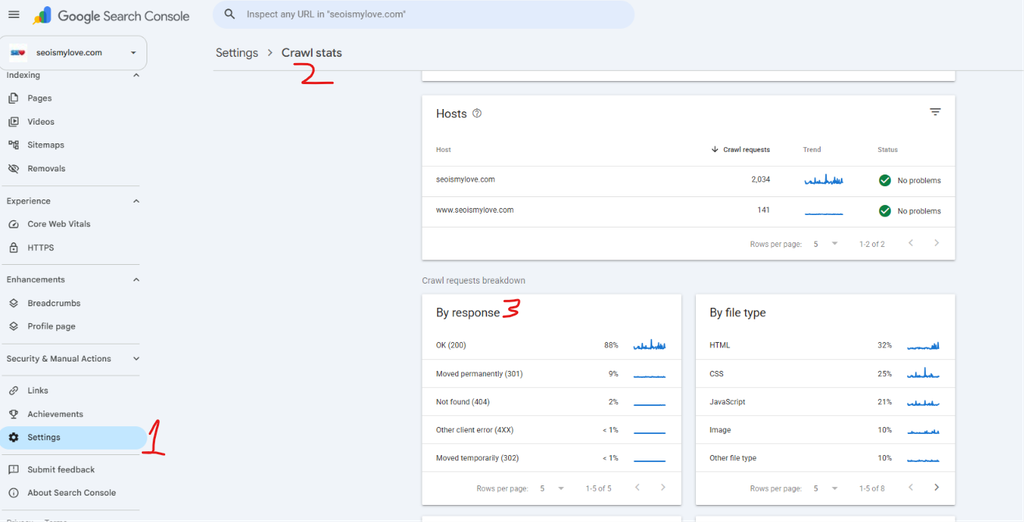
Google Search Console describes the 304 response as Not modified (304): The page has not changed since the last crawl request.
Google categorizes it as a perfectly normal response.
If you see 304 responses in your crawl data, don’t immediately try to fix them.
Instead, investigate whether the responses are correct.
Here is what I would check:
- Are unchanged pages returning 304?
- Are updated pages returning 200 when requested conditionally?
- Are modification timestamps accurate?
- Are ETags changing when the underlying content changes?
- Are CDN and server caching rules working together correctly?
A large number of 304 responses is not automatically a problem. Their correctness matters more than their count.
How to check HTTP 304 responses on your website
You don’t need an expensive SEO crawler to investigate this.
You can use Chrome DevTools, cURL, or your server logs.
Method 1: Check using Chrome DevTools
Follow these steps:
- Open your website in Google Chrome.
- Press
F12to open Developer Tools. - Select the Network tab.
- Enable the Disable cache option.
- Reload the page.
- Check the Status column.
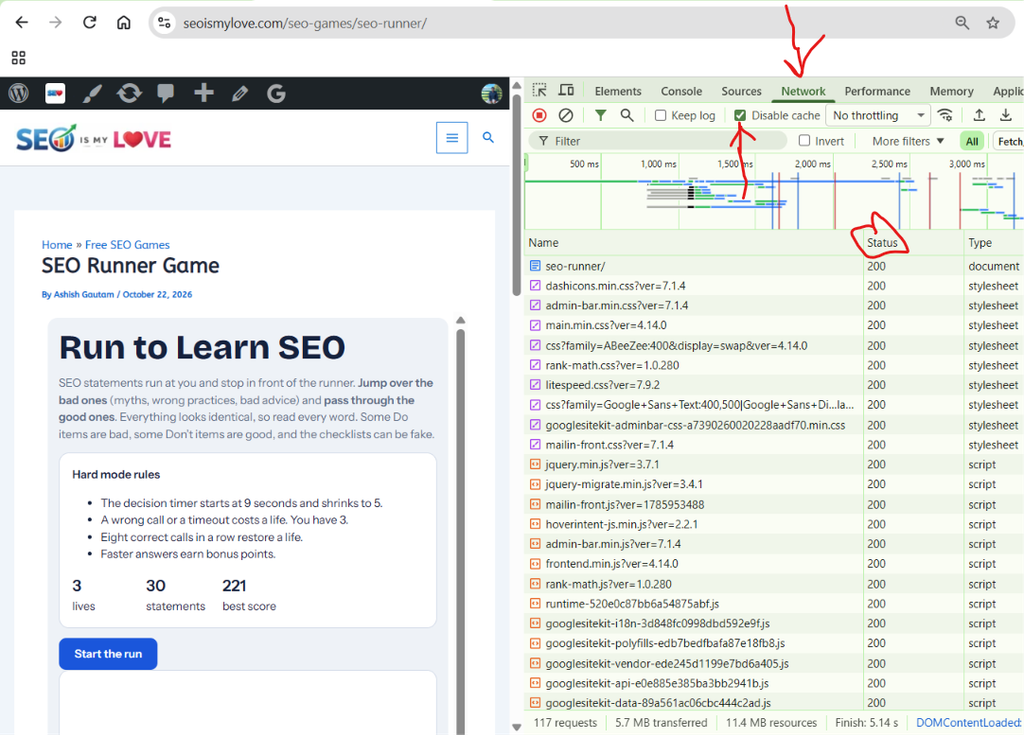
You may see a 200 response.
Now, uncheck Disable cache and reload the page again.
Depending on the browser cache and server configuration, you may see a 304 response.
Click the request that showed a 304 response and inspect the Headers tab.
Look for:
If-Modified-SinceIf-None-MatchLast-ModifiedETagCache-ControlExpires
Important: Chrome DevTools can display 304 responses generated by ordinary browser cache validation. This does not prove that Googlebot receives the same response. MDN
Method 2: Check using cURL
You can also test conditional requests using the command line.
First, request the page normally:
curl -I https://example.com/seo-guide/Look for headers such as:
HTTP/2 200
last-modified: Tue, 20 Oct 2026 10:30:00 GMT
etag: "article-v1"
cache-control: public, max-age=0, must-revalidate
Your actual headers will depend on your server and caching configuration.
Now, test the If-Modified-Since header:
curl -I \
-H "If-Modified-Since: Tue, 20 Oct 2026 10:30:00 GMT" \
https://example.com/seo-guide/
If the resource has not changed since that timestamp, you may receive:
HTTP/2 304You can also test ETag validation:
curl -I \
-H 'If-None-Match: "article-v1"' \
https://example.com/seo-guide/
If the ETag matches the current representation, the expected response is 304.
Note: These are conditional-request tests, not proof of Google’s actual crawl behaviour. Your server may not support these validators, and an ETag copied from an earlier response may no longer match.
Method 3: Check server logs
If you manage a large website, server logs are one of the most useful places to investigate HTTP 304 behaviour.
Look for:
- Googlebot requests.
- Requested URLs.
- HTTP response codes.
- Request headers.
- Response headers, if logged.
- Request timestamps.
You can filter requests returning 304 and compare them with requests returning 200.
For example:
| URL | Response | Observation |
|---|---|---|
/seo-guide/ | 304 | Content unchanged |
/technical-seo/ | 200 | Updated content |
/seo-tools/ | 304 | Content unchanged |
/seo-news/ | 200 | Updated content |
This is a simplified example, not actual crawl data.
One important detail: verify Googlebot requests rather than relying on the user-agent name alone. User-agent strings can be spoofed. Use Google’s published IP verification process or reverse and forward DNS checks to confirm genuine Googlebot traffic.
HTTP 304 implementation: What should SEO professionals check?
You don’t need to force every website to return 304 responses.
The goal is to make sure your website handles conditional requests correctly.
Here are the technical areas worth checking.
1. Check Last-Modified accuracy
Your server should return a meaningful Last-Modified timestamp.
For example:
Last-Modified: Tue, 20 Oct 2026 10:30:00 GMTIf you update the article on October 25, the timestamp should reflect that change.
A common implementation mistake is using the original publication date instead of the actual modification date.
Another mistake is updating the timestamp whenever a minor, irrelevant backend operation occurs.
Both can lead to poor cache validation.
For SEO, I recommend checking whether your modification timestamp reflects meaningful changes to the page representation.
2. Make sure ETags are updated correctly
ETags should identify the correct version of the resource.
For example:
ETag: "v1"After a meaningful update:
ETag: "v2"If your website changes its content but continues returning the old ETag, a conditional request can incorrectly produce a 304.
Also check how your CDN handles ETags.
Some servers generate ETags using file metadata, while others generate them from content hashes. Compression and different response representations can also affect validator handling.
3. Check CDN caching rules
Many websites use services such as Cloudflare or hosting-level caching systems.
These services can cache HTML, images, CSS, and JavaScript files.
Check whether your CDN:
- Preserves or correctly manages ETag headers.
- Handles Last-Modified correctly.
- Revalidates content after updates.
- Purges outdated cached content when necessary.
- Uses appropriate cache keys for different page versions.
A CDN serving stale content is not automatically an HTTP 304 problem. But incorrect interaction between the CDN and origin server can create misleading validation responses.
4. Don’t use 304 as a replacement for other status codes
This is a mistake worth highlighting.
A 304 response does not mean that a page is unavailable, deleted, or redirected.
Use the appropriate response:
| Situation | Correct response |
|---|---|
| Page exists and is being served normally | 200 |
| Page hasn’t changed since validation | 304 |
| Page permanently moved | 301 |
| Page temporarily moved | 302 or 307 |
| Page no longer exists | 404 or 410 |
| Server has successfully delivered only a requested portion of a resource | 206 |
| Server has an internal failure | 500 |
Never return a 304 for a deleted page just to avoid sending a 404.
5. Don’t rely on 304 to solve crawl budget problems
This is another misconception.
Supporting 304 can improve crawl efficiency, but it won’t magically fix poor crawl management.
If Googlebot is spending time crawling thousands of unnecessary URLs, investigate the actual reasons.
For example:
- Duplicate URLs generated by filters.
- Unnecessary URL parameters.
- Infinite URL spaces.
- Broken internal links.
- Poor internal linking.
- Low-value pages.
- Incorrect canonical tags.
Google’s crawl budget guidance also explains that freeing up crawl activity does not automatically transfer it to other pages unless Google is already hitting your site’s crawl capacity limit. Google for Developers+1
Does HTTP 304 work differently on WordPress and other CMS platforms?
The underlying HTTP behaviour is the same, regardless of the CMS.
However, the implementation can differ.
WordPress
WordPress websites commonly use caching plugins, hosting-level caching, and CDNs.
For example, a website might use:
- LiteSpeed Cache.
- WP Rocket.
- W3 Total Cache.
- Cloudflare.
- Server-level Nginx or Apache caching.
These systems may handle conditional requests automatically.
You should not install another plugin just to generate 304 responses.
Instead, check whether your existing caching system sends valid ETag or Last-Modified headers and correctly revalidates updated content.
Also, don’t assume that changing a WordPress post’s post_modified date automatically guarantees that every caching layer will return the correct response.
Next.js and custom websites
For Next.js, Laravel, React-based applications, and custom websites, the implementation depends on how the application and hosting infrastructure serve the content.
Check:
- Whether the origin server generates validators.
- Whether your CDN preserves them.
- Whether cached HTML is invalidated after a content update.
- Whether dynamic pages have appropriate cache policies.
For dynamically generated pages, be particularly careful about creating validators based on incomplete data.
For example, if a product page changes its price based on location but the cache validator ignores location, the server could incorrectly treat two different representations as identical.
The important point is that the validator must represent the actual resource being served.
Common HTTP 304 SEO mistakes
Here are the mistakes I diagnosed in technical SEO audits.
| Mistake | Potential consequence |
|---|---|
| Returning 304 after updating content | Google may reuse its previous version |
| Incorrect Last-Modified date | Unnecessary 200 responses or stale validation |
| Static ETag despite content changes | Incorrect 304 responses |
| CDN serving outdated cached HTML | Visitors and crawlers may receive stale content |
| Treating 304 as a redirect | Incorrect understanding of crawl behaviour |
| Returning 304 for deleted URLs | Incorrect handling of removed content |
| Assuming every Googlebot request uses conditional headers | Misleading crawl analysis |
| Treating every 304 in Search Console as an error | Unnecessary technical changes |
My recommended HTTP 304 audit checklist
If I were auditing a website, I would use this checklist:
- Check whether HTML pages return valid Last-Modified or ETag headers.
- Send conditional requests using If-Modified-Since.
- Send conditional requests using If-None-Match.
- Confirm unchanged pages return 304 when validators are supported.
- Confirm updated pages return 200 with the latest content when validators are supported.
- Verify that ETags change when the relevant representation changes.
- Check CDN cache invalidation after publishing content updates.
- Inspect genuine Googlebot requests in server logs.
- Compare 304 and 200 responses against actual content changes.
- Review the Crawl Stats report in Google Search Console.
HTTP 304 vs 200 vs 301 vs 404: What’s the SEO difference?
These status codes are often confused during technical SEO audits.
Here is a practical comparison:
| Status code | Meaning | SEO interpretation |
|---|---|---|
| 200 | OK | Page content is available for processing |
| 301 | Permanent redirect | Strong signal that the destination should be processed |
| 302 | Temporary redirect | Temporary move; destination is generally followed |
| 304 | Not Modified | Previously stored content can be reused |
| 404 | Not Found | Page does not exist |
| 410 | Gone | Page has been permanently removed |
| 500 | Internal Server Error | Server failed to fulfil the request |
One interesting technical detail: although 304 belongs to the 3xx HTTP status-code family, it does not work like a conventional redirect. It does not send the crawler to another URL. It allows the client to reuse its stored representation.
Frequently asked questions about HTTP 304 and SEO
1. Does HTTP 304 affect Google rankings?
No. Google does not treat a 304 response as a direct ranking signal. It tells Google that the content is unchanged since the previous crawl, allowing it to reuse the stored version.
2. Does HTTP 304 help with crawl budget?
It can improve crawl efficiency by reducing unnecessary data transfers and server resource usage. However, it does not guarantee that Google will crawl more URLs or increase your crawl budget.
3. Why does my website return 304 instead of 200?
Your browser or crawler may be sending a conditional request using If-Modified-Since or If-None-Match. If the server determines that the resource has not changed, it returns 304 instead of transferring the complete response again.
4. Can Google index a page that returns 304?
Yes. Google can use the previously crawled content associated with that URL. A 304 response does not remove an already indexed page.
5. Should I fix 304 errors in Google Search Console?
No. A 304 response is not an error that needs fixing by default. Check whether your server correctly identifies unchanged and updated content.
6. Should every website implement HTTP 304?
Websites can benefit from correct HTTP caching, but you don’t need to force 304 responses on every URL. Your server, CDN or hosting platform may already support conditional requests.
7. Can HTTP 304 prevent Google from seeing updated content?
Yes, if the server incorrectly determines that updated content is unchanged. Incorrect ETags, outdated Last-Modified headers and caching issues can cause this problem.
8. Is HTTP 304 better than HTTP 200?
Neither is universally better. A 200 response is appropriate when the current representation needs to be transferred. A 304 is appropriate when the client already has a valid representation and the resource hasn’t changed.
9. Does a 304 response have a response body?
No. A 304 response must not contain a message body. The client uses its previously stored response.
10. Can HTTP 304 affect website speed?
It can reduce bandwidth and data transfer for repeat requests. However, it does not necessarily make the initial page load faster, and it does not replace other performance optimizations.
My Opinion: Should you worry about the HTTP 304 Not Modified Status Code?
Not really.
If your website returns 304 responses for genuinely unchanged pages, that’s a good sign that conditional caching is working as intended.
You don’t need to chase a higher number of 304 responses or try to replace every 200 response with 304.
What matters is whether your website sends the correct response when its content changes.
As an SEO professional, I would pay more attention to incorrect cache validation than to the number of 304 responses reported by a crawler.
A website with properly configured HTTP caching, accurate content validators, and reliable CDN invalidation is in a much better position than one that simply returns 304 frequently.
My recommendation: Don’t treat HTTP 304 as an SEO problem. Treat it as a technical SEO checkpoint. Verify that your server knows the difference between content that hasn’t changed and content that has.
Useful sources:
- Google: How HTTP Status Codes Affect Google’s Crawlers – Explains Google’s treatment of 304 responses and their impact on indexing.
- Google: Crawl Budget Management – Explains why Google recommends HTTP caching and 304 responses.
- Google: Troubleshoot Crawling Errors – Covers conditional request headers and how Google handles unchanged content.
- Google Search Console: Crawl Stats Report – Explains how 304 appears in crawl statistics.
- MDN: 304 Not Modified – Technical explanation and response-header requirements.
- RFC 9110: HTTP Semantics – The official HTTP standard.
- Search Engine Journal: Crawl Budget Optimization – Practical SEO discussion of 304 implementation.
- Search Engine Journal: Google Recommends Using 304 – Discusses Google’s updated recommendation.
- RFC 9111: HTTP Caching – Explains cache validation and conditional requests.
- RFC 7232: Conditional Requests – Earlier technical specification for conditional HTTP requests.

I am an SEO specialist with more than 7 years of hands-on experience in SEO, organic content marketing, technical SEO, and social media. I have an engineering degree, giving me an unusual combination of technical understanding and digital marketing expertise. Know more about me.