
You have a website. You have published a few articles, added some keywords, installed an SEO plugin, and maybe even submitted your sitemap to Google.
But there is one problem.
Your website is still not getting organic traffic.
You search for your target keywords, but your website is nowhere to be found. Sometimes Google indexes your pages; sometimes it doesn’t. You read SEO tips online, follow them, and end up with even more questions.
Should you build backlinks first? Should you publish more articles? Do you need an SEO plugin? Should you optimize every page for a keyword?
This is where most SEO beginners get confused.
SEO isn’t difficult because every task requires technical knowledge. It’s difficult because beginners often try to do everything at once without understanding what needs to be done first.
I’ve spent more than seven years working in SEO, and one thing I’ve learned is that doing the right SEO tasks in the right order is more useful than completing a long checklist of random SEO activities.
In this guide, I’ll walk you through how to do SEO for a website from scratch. We’ll cover keyword research, content optimization, technical SEO, link building, and performance tracking, with practical examples you can apply to your own website.
You don’t need an expensive SEO tool or a developer to get started. You need a website you can work on, some patience, and a willingness to test what you learn.
Before starting SEO, understand what you are trying to achieve
Let’s say you own a website that sells handmade leather wallets.
You want people searching for leather wallets to discover your website.
Now consider these searches:
- How are leather wallets made?
- Best leather wallets for men.
- Buy handmade leather wallets online.
- How to clean a leather wallet?
All four searches relate to leather wallets, but they don’t represent the same need.
Someone searching for how to clean a wallet wants instructions. Someone searching for the best leather wallets may be comparing products. Someone searching to buy a handmade leather wallet is closer to making a purchase.
Your SEO strategy should reflect these differences.
If you only publish informational articles, you may attract visitors who never become customers. If you only create product pages, you may miss people who are still researching.
So, before touching your website, answer three questions:
- What does my website offer?
- Who am I trying to reach?
- What do I want visitors to do after finding my website?
Your answers will guide almost every SEO decision you make.
Step 1: Set up the essential SEO tools
You don’t need ten paid subscriptions to start doing SEO.
Start with tools that help you understand how search engines interact with your website and how people find it.
Google Search Console: Monitor indexing, impressions, clicks, search queries, and technical issues.
Google Analytics 4: Understand website visitors, traffic sources, engagement, and conversions.
Bing Webmaster Tools: Monitor Bing search performance, indexing, and website health.
You can also use free browser tools and paid platforms such as Ahrefs and Semrush when you need deeper keyword, backlink, and competitor research.
Which tool should you use first?
Start with Google Search Console.
It tells you whether Google is discovering your pages, which queries are generating impressions, and which pages are receiving clicks.
Google Analytics answers a different question: what happens after someone visits your website?
Don’t confuse the two. A page can receive search impressions without clicks, and it can receive clicks without generating meaningful business results.
Your first task: Verify your website in Google Search Console and submit its sitemap.
Step 2: Check whether Google can find and index your website
Before writing 50 articles, make sure Google can actually access the pages you publish.
This is one of the most overlooked steps when beginners start SEO.
A website can look perfect to visitors while search engines struggle to crawl or index important pages.
Let’s check the basics.
1. Check your website’s indexing status
Open Google and search:
site:yourdomain.comReplace yourdomain.com with your actual domain.
Google may show pages from your website that it has indexed.
For example:
site:example.comThis is a quick way to discover indexed pages, but it is not a complete or exact indexing report.
For accurate URL-level information, use the URL Inspection tool in Google Search Console.
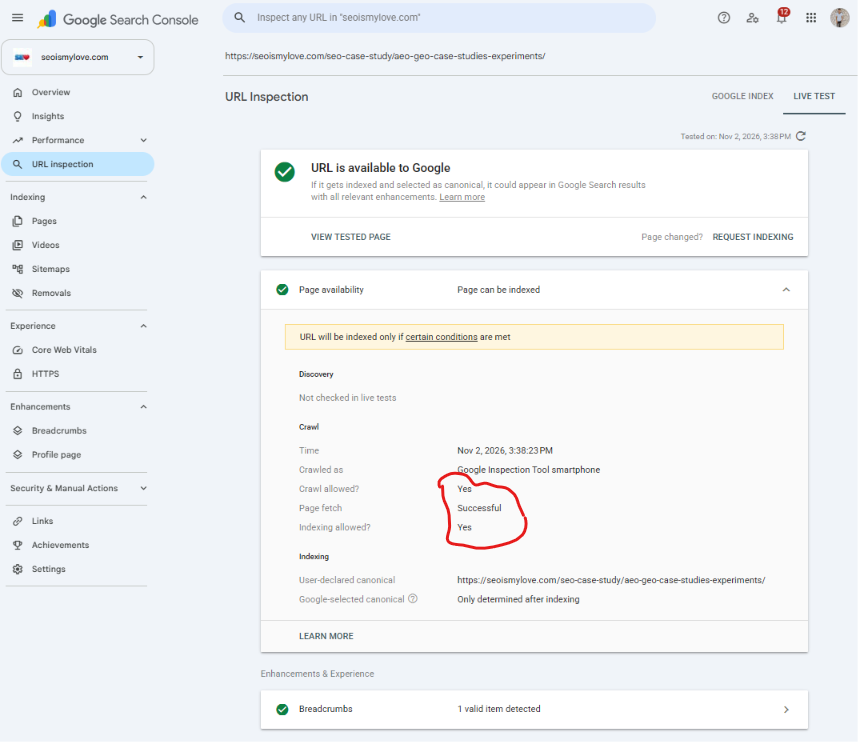
Enter a page URL and check:
- Whether the URL is indexed.
- Whether Google can crawl it.
- Whether indexing is allowed.
- Whether Google selected a different canonical URL.
- When Google last crawled it, if that information is available.
If a page isn’t indexed, don’t immediately submit it for indexing repeatedly.
First, find out why. Feel free to connect with me; I will help you analyze the issue without charging anything.
2. Check your robots.txt file
Your robots.txt file gives crawling instructions to search engine crawlers.
You can usually access it here:
https://yourdomain.com/robots.txtA simple example:
User-agent: *
Allow: /

Sitemap: https://example.com/sitemap.xml
Check that you haven’t accidentally blocked important sections of your website.
For example:
User-agent: *
Disallow: /
This blocks crawling across the entire website for compliant crawlers.
Also remember that robots.txt is not a reliable way to prevent a URL from appearing in search results. If you need to prevent indexing, use an appropriate noindex directive and allow crawling so Google can see it.
3. Check your XML sitemap
A sitemap helps search engines discover important URLs.
For a small website, your sitemap might contain:
https://example.com/about/
https://example.com/services/
https://example.com/blog/
https://example.com/blog/seo-basics/
Check that it contains:
- Important, canonical URLs.
- Pages that return successful responses.
- URLs you actually want search engines to index.
Avoid adding redirected URLs, deleted pages, and unnecessary parameter variations.
Submit your sitemap through the Sitemaps section in Google Search Console.
One important point: submitting a sitemap does not guarantee indexing. It helps Google discover URLs; Google still decides which pages to index.
4. Check whether important pages use noindex
Open the source code (CTRL+U) of an important page and search for:
<meta name="robots" content="noindex">If this directive is present, search engines that respect it should not index the page.
Some CMS platforms and SEO plugins allow you to control indexing through individual page settings.
A beginner can accidentally set an entire website or blog category to noindex while experimenting with these settings.
Check your homepage, service pages, product pages, and important articles.
My advice: Fix crawling and indexing problems before spending money on backlinks or publishing more content. More content won’t solve a website-wide indexing problem.
Step 3: Find the right keywords for your website
Now that your website is accessible to Google, it’s time to understand what people are searching for.
This is where keyword research comes in.
A keyword is a word or phrase people enter into a search engine. Your job is to find relevant searches and create pages that satisfy the needs behind them.
But don’t start by searching for keywords with the highest search volume. That’s one of the biggest mistakes SEO beginners make.
Start with your website’s main topic
Let’s continue with our handmade leather wallet example.
You can start with these seed keywords:
- Handmade leather wallets
- Leather wallets for men
- Leather wallet care
- Leather wallet buying guide
- Genuine leather wallets
These are broad topics. You can expand them into more specific searches.
For example:
| Seed keyword | Keyword ideas |
|---|---|
| Leather wallets | Best leather wallets for men |
| Handmade wallets | Handmade leather wallet online |
| Wallet care | How to clean a leather wallet |
| Wallet buying guide | What to check before buying a leather wallet |
| Genuine leather | Genuine leather vs faux leather |
You can discover these ideas using Google Autocomplete, related searches, Google Trends, and keyword research tools.
Use Google Autocomplete for keyword ideas
Open Google and start typing a topic.
For example:
how to clean a leather...Google may suggest searches such as:
- How to clean a leather wallet.
- How to clean a leather wallet at home.
- How to clean a leather wallet without damaging it.
These suggestions can reveal how people phrase their searches.
You can also check the People Also Ask section and related searches.
Don’t blindly turn every suggestion into a separate article. Some searches have almost the same intent and should be covered on one page.
Understand search intent before selecting keywords
This is more important than finding a keyword with a high search volume.
Search intent means understanding what a person expects to find after entering a query.
There are four common search intent types:
| Search intent | Example | Suitable page |
|---|---|---|
| Informational | How to clean a leather wallet | Blog article |
| Commercial | Best leather wallets for men | Comparison page |
| Transactional | Buy handmade leather wallet | Product page |
| Navigational | Brand X leather wallet | Brand or product page |
Here’s a practical example.
Suppose you want to target the keyword: Buy handmade leather wallets online
What should you create?
An article explaining the history of leather wallets?
No. That would not satisfy the searcher’s main requirement.
You need a product or category page where visitors can explore wallets, compare options, and make a purchase.
This is why search intent matters.
A page can contain the right keywords and still struggle because it offers the wrong type of content.
How to select keywords as a beginner
Don’t worry about finding the perfect keyword on your first attempt.
Use these factors:
- Relevance: Does the keyword relate to your website?
- Intent: Can your page satisfy what the searcher wants?
- Competition: Are the ranking pages realistic competitors?
- Business value: Can this search bring relevant visitors, leads, or sales?
- Content opportunity: Can you provide something better or more useful than existing results?
Search volume is useful, but it shouldn’t be your only selection criterion.
A keyword with 100 monthly searches that brings potential customers can be more valuable than a keyword with 10,000 searches that brings unrelated visitors.
A practical keyword research exercise
Suppose you run a website about SEO.
You collect these keywords:
| Keyword | Intent | Recommended content |
|---|---|---|
| What is technical SEO | Informational | Beginner guide |
| Technical SEO checklist | Informational | Checklist |
| Technical SEO services | Commercial | Service page |
| Hire technical SEO expert | Transactional | Service or landing page |
| Technical SEO audit tools | Commercial | Tool comparison |
Notice that all these keywords belong to the same subject, but they need different content formats.
SEO Beginner tip: Create a spreadsheet with your keywords, search intent, target URL, and content type. This will help you avoid publishing multiple pages targeting the same search intent.
Step 4: Study the pages already ranking on Google
Once you have a keyword, don’t immediately start writing.
Search for it on Google.
Look at the first page and study what Google is showing.
For example, search:
how to do keyword researchObserve the results.
- Are most results beginner guides?
- Are they step-by-step tutorials?
- Are they videos?
- Are they tool-based guides?
- Are they comparison articles?
- Do they answer specific questions?
This gives you an idea of the content format that currently satisfies the search.
What should you analyze?
I recommend checking these six things:
1. Content format
Is Google ranking tutorials, listicles, product pages, or service pages?
2. Topic coverage
What important subtopics do the ranking pages cover?
3. Missing information
Are there practical questions that existing articles don’t answer?
4. Content freshness
Does the topic require current information, recent examples, or updated screenshots?
5. Website relevance
Are the ranking websites closely related to the topic, or are large general websites dominating the results?
6. User experience
Are the articles easy to read? Do they provide useful examples, original images, and clear navigation?
You don’t need to copy the top-ranking articles.
In fact, copying their headings and adding a few paragraphs is not a good content strategy.
Use competitor research to understand what searchers expect. Then find something useful you can add.
For example, if the top five articles explain keyword research but none shows how to map keywords to actual website URLs, you have an opportunity to provide that missing explanation.
That’s a much better approach than simply writing a longer article.
Step 5: Create useful content that deserves to rank
Now comes the part where you create the actual content.
You have a keyword, understand its intent, and have studied the existing search results.
Your next job is to create a page that genuinely helps the reader.
Google recommends creating helpful, reliable, and people-first content. It also warns against publishing large amounts of content simply to attract search traffic.
Don’t write articles just to target keywords
Let’s say you want to rank for:
How to fix broken linksA weak article might explain what broken links are, list a few generic benefits, and finish with a conclusion.
A useful article should explain:
- What broken links are.
- Why they happen.
- How to find them.
- How to identify internal and external broken links.
- How to fix each type.
- When to redirect a URL.
- When to remove a link instead.
- How to check whether the fix worked.
You should also show real examples where possible.
For example:
Old URL: /seo-tools/broken-link-checker/
New URL: /tools/broken-link-checker/
If the old URL has permanently moved and the new page serves the same purpose, a relevant 301 redirect may be appropriate.
This gives the reader something they can actually use.
Add your own experience
This is where an experienced website owner or marketer can stand apart from hundreds of generic articles.
You can add:
- Screenshots from your own website.
- Results from experiments.
- Mistakes you have encountered.
- Before-and-after comparisons.
- Real examples.
- Practical limitations of tools.
- Lessons learned while implementing something.
For example, instead of writing “Internal linking is important for SEO.”
Explain how you found an important article that had no internal links, added relevant links from three related pages, and then monitored its crawling and search performance.
Don’t claim that the change improved rankings unless you have data to support it.
Use AI carefully
AI tools can help you brainstorm topics, organize research, explain technical concepts, and improve readability.
But publishing AI-generated articles without checking facts, adding expertise, or improving the content is a poor strategy.
Google’s guidance focuses on the quality and value of content, not simply whether AI was used to produce it. Scaled content created mainly to manipulate search rankings can violate its spam policies.
Use AI as an assistant, not as a replacement for research and editorial judgment.
Step 6: Optimize your pages (On-page SEO)
You’ve created useful content. Now make sure the page is properly structured.
On-page SEO helps search engines and visitors understand what your page is about.
Here are the elements you should work on.
1. Write a clear SEO title
Your title should explain what the page offers.
Suppose your target keyword is How to clean a leather wallet.
A suitable title could be How to Clean a Leather Wallet Without Damaging It
Avoid titles like “Leather Wallet: Everything You Need to Know About the Best Leather Wallet Cleaning Methods and Tips.”
The second title is unnecessarily long and confusing.
Keep titles descriptive, unique, and relevant to the page. Google may generate title links using multiple sources, so your specified title isn’t guaranteed to appear exactly as written.
2. Write a useful meta description
A meta description summarizes the page.
Example:
“Learn how to clean a leather wallet safely. Follow simple steps to remove dirt, handle stains, and maintain your wallet without damaging the leather.”
It should encourage the right visitors to click.
Note: Google may use your meta description or generate a different snippet from the page content.
3. Use headings properly
Organize your content using a logical heading structure.
For example:
H1: How to Clean a Leather Wallet

  H2: What You Need Before Cleaning

  H2: How to Clean a Leather Wallet
    H3: Remove Dust and Dirt
    H3: Clean the Surface
    H3: Dry the Wallet

  H2: Common Mistakes to Avoid

  H2: Frequently Asked Questions
Use one clear main heading for the page and meaningful subheadings.
Don’t add keywords to every heading just because you think it will improve rankings.
4. Optimize your URL
Keep URLs readable and descriptive.
Good:
example.com/how-to-clean-leather-wallet/Not ideal:
example.com/?p=48392Avoid changing existing URLs without a good reason. If you do change one, plan the appropriate redirects and update internal links.
5. Add relevant internal links
Internal links connect one page of your website to another.
Suppose you publish these articles:
- What is technical SEO?
- Technical SEO checklist.
- How to fix crawling issues.
- How to create an XML sitemap.
You can link related articles naturally.
For example, in your article about crawling issues, link to your XML sitemap guide when discussing sitemap discovery.
This helps readers explore related information and helps search engines discover other pages.
Use descriptive anchor text.
Instead of “Click here to read more.”
Write “Learn how to create an XML sitemap.”
6. Optimize images
Images make content easier to understand and can also help people discover your website through image search.
Follow these basic practices:
- Use relevant images.
- Compress images without damaging quality.
- Choose appropriate image formats such as WebP or AVIF when supported.
- Use descriptive filenames.
- Add meaningful alt text when the image needs a text alternative.
- Use responsive images and appropriate dimensions.
Example:
  file name="leather-wallet-cleaning.webp"
  alt="Cleaning a brown leather wallet with a soft cloth"
Don’t stuff keywords into alt text. Describe what the image actually shows.
7. Add structured data where relevant
Structured data helps search engines understand specific information about a page.
For example:
- Article.
- Product.
- Organization.
- LocalBusiness.
- BreadcrumbList.
Use schema that matches the visible content on your website.
Don’t add every available schema type to every page. Structured data does not guarantee rich results or higher rankings.
You can validate supported markup using Google’s Rich Results Test.
Step 7: Learn the basics of Technical SEO
You don’t need to become a developer to start doing SEO.
But you should understand the technical issues that can stop search engines from accessing or understanding your pages.
Here are the areas worth learning first.
Website speed and Core Web Vitals
A slow website can frustrate visitors, especially on mobile devices.
Google uses page experience signals, including Core Web Vitals, as part of its ranking systems. However, good scores don’t guarantee higher rankings.
Learn these three metrics:
| Metric | What it measures | Good target |
|---|---|---|
| LCP | Loading performance | 2.5 seconds or less |
| INP | Interaction responsiveness | 200 milliseconds or less |
| CLS | Visual stability | 0.1 or less |
These are Google’s recommended thresholds at the 75th percentile of page loads.
Use PageSpeed Insights.
Start by fixing obvious problems such as oversized images, unnecessary scripts, and poor mobile layouts.
Don’t spend days trying to move a performance score from 95 to 100 while ignoring broken pages or poor content.
Mobile-friendly website
Open your website on a mobile phone.
Check:
- Is the text readable?
- Do buttons work?
- Does the menu open properly?
- Are images fitting the screen?
- Is content hidden or overlapping?
- Can visitors complete a purchase or enquiry?
Google primarily uses the mobile version of a website’s content for indexing. Make sure important content and links are available on mobile too.
HTTPS and website security
Your website should use HTTPS.
Check that:
- Your SSL certificate is valid.
- HTTP URLs redirect correctly to HTTPS.
- You don’t have mixed-content issues.
- Canonical URLs use the preferred HTTPS version.
Understand crawlability and indexability
These are different concepts.
- Crawlability: Can a search engine access and follow the URL?
- Indexability: Is the page allowed and suitable for inclusion in the search index?
A page can be crawlable but not indexable. For example, it might contain a noindex directive.
Learn how robots.txt, canonical tags, redirects, status codes, and XML sitemaps work.
You don’t have to master all technical SEO concepts immediately. Learn them as you encounter real website problems.
Step 8: Build authority and earn backlinks
You’ve created useful pages and fixed the important technical issues.
Now think about how people and other websites discover your content.
Backlinks are links from other websites pointing to your website.
They can help search engines discover pages and understand how websites reference your content. Relevant, editorially earned links can also support your site’s reputation and visibility.
But don’t confuse link building with buying hundreds of random links.
How can SEO beginners get backlinks?
Here are some practical methods.
1. Publish something worth referencing
Create useful resources such as:
- Original research.
- Free tools.
- Industry statistics.
- Detailed tutorials.
- Useful templates.
- Case studies.
People are more likely to reference something that adds value to their own content.
2. Guest contributions
Write genuinely useful articles for relevant websites that accept outside contributors.
Focus on audience relevance and editorial quality, not just whether the website offers a dofollow link.
3. Digital PR
Share original research, expert opinions, and interesting findings with relevant journalists and publishers.
4. Participate in relevant communities
Answer questions in industry communities, forums, and professional groups.
Don’t spam links. Help people first.
5. Broken external links on sites
Check if a website has broken external links or if you have a better version than the existing external link on that page. Ask them to replace it with your link.
6. Reclaim unlinked brand mentions
Sometimes another website mentions your brand without linking to it.
You can contact the publisher and politely ask whether they would consider adding a link where it helps readers.
What should you avoid?
Stay away from:
- Paid link schemes designed to manipulate rankings.
- Automated link-building software.
- Private blog networks.
- Irrelevant directory submissions.
- Spam comments.
- Mass forum links.
- Excessive reciprocal linking.
My advice: Build a website that people have a reason to mention. Link building becomes much easier when you have something useful to offer.
Step 9: Optimize your website for local SEO (if you serve a local market)
If you run a local business, your SEO strategy should include local search.
For example, imagine you own a dental clinic in London.
Someone searching for:
dentist near mehas a different requirement from someone searching for:
how to brush teeth properlyYou need to help local customers discover your business.
Start with these tasks:
- Create and verify your Google Business Profile if your business is eligible.
- Add accurate business information.
- Select relevant business categories.
- Maintain consistent contact information.
- Add genuine photographs.
- Collect honest customer reviews.
- Create useful location and service pages.
- Keep business hours updated.
Your website and Business Profile should provide accurate, matching information.
Don’t create dozens of nearly identical location pages just by replacing city names. Each location page should offer genuine value to people in that area.
If you don’t serve customers at a physical location, don’t create a fake address to appear in local search.
Step 10: Measure your SEO performance
This is the step that separates people who simply publish content from people who actually do SEO.
Publishing an article is not the end of SEO.
You need to monitor what happens after publishing it.
Open Google Search Console and select the Performance report.
Look at four important metrics:
| Metric | What it tells you |
|---|---|
| Impressions | How often your result appeared in Google Search |
| Clicks | How many visits came from search results |
| CTR | The percentage of impressions that resulted in clicks |
| Average position | The average position of your topmost result for the measured searches |
How to use this data
Let’s consider a hypothetical example:
| Keyword | Impressions | Clicks | Average position |
|---|---|---|---|
| SEO for beginners | 2,000 | 40 | 18 |
| How to do keyword research | 1,500 | 90 | 9 |
| Free SEO tools | 3,000 | 15 | 12 |
What can you learn?
SEO for beginners: The page is getting impressions but relatively few clicks. Check its search intent, title, snippet, and ranking position.
How to do keyword research: This page is performing better. Study what is working and identify relevant improvements.
Free SEO tools: The page has visibility but a low CTR. Check whether your title accurately communicates the value of the page and whether it matches the queries generating impressions.
Don’t make decisions based on one day’s data. Compare suitable date ranges and account for seasonality, changes in demand, and search-result features.
What if your page gets impressions but no clicks?
This is a common situation.
Possible reasons include:
- Your page ranks too low.
- The title doesn’t match the search query.
- The search intent is different.
- Other search features answer the question directly.
- The snippet doesn’t communicate enough value.
- Your result isn’t competitive with the alternatives.
Don’t immediately rewrite the entire article.
First, inspect the queries that generate impressions and compare them with the content on your page.
You may discover that the page is ranking for searches you never intended to target.
That information can help you improve the content or create a more suitable page.
Step 11: Understand SEO in the age of AI search
If you’re starting SEO in 2026, you cannot ignore AI-powered search experiences.
People are discovering information through Google AI Overviews, AI Mode, ChatGPT, Perplexity, and other platforms.
Does this mean you need to learn an entirely different SEO process?
No.
Google’s current guidance says that its existing SEO best practices remain relevant for AI Overviews and AI Mode. There are no additional technical requirements or special schema types needed to appear in these features.
Here is what I recommend:
- Publish original information instead of repeating common answers.
- Explain complex topics clearly.
- Include real examples and first-hand experience.
- Make important content accessible in text.
- Build a clear website structure.
- Use descriptive internal links.
- Maintain accurate information.
- Make your brand recognizable beyond search engines.
Also, don’t get distracted by every new acronym.
AEO, GEO, and AI SEO can describe different approaches to improving visibility, but they don’t replace the fundamentals of making useful content discoverable.
For a beginner, learning how to research a topic, satisfy search intent, create a technically accessible website, and measure performance is still the best starting point.
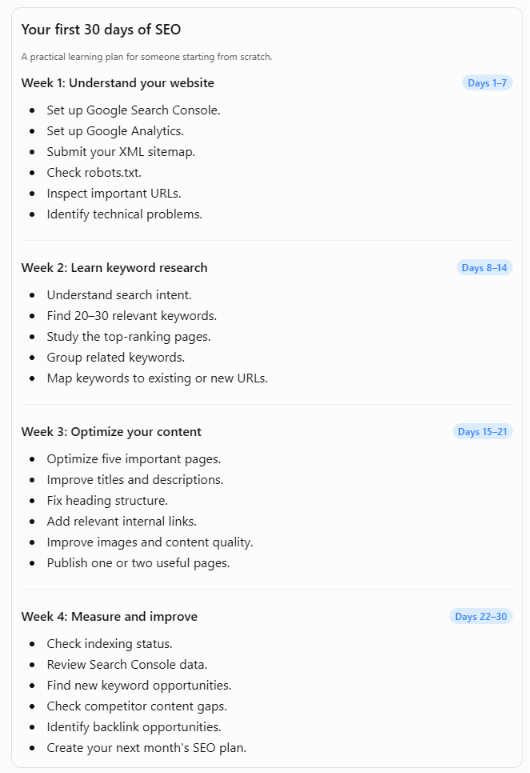
Step 12: Follow a 30-day SEO plan as a beginner
Reading about SEO is useful, but you won’t learn much until you start working on an actual website.
Instead of trying to learn everything in one week, follow this practical 30-day plan.
Common SEO mistakes beginners should avoid
I’ve seen beginners spend weeks on tasks that have little impact while ignoring problems that actually matter.
Here are some mistakes worth avoiding.
1. Targeting keywords only because they have high search volume
High search volume doesn’t automatically mean high business value.
A relevant keyword with lower search volume can attract visitors who are more likely to become customers.
2. Publishing too many articles too quickly
Publishing 30 articles in a month isn’t an achievement if none of them offers anything useful.
Start with fewer, well-researched pages.
3. Ignoring search intent
An informational article cannot always compete with a product page for a transactional search.
Understand what Google is showing before choosing your content format.
4. Building backlinks before fixing your website
If your important pages are blocked, broken, or poorly structured, building more backlinks isn’t the first thing you should prioritize.
Fix the foundation first.
5. Changing URLs without redirects
Changing a URL can break existing links and create unnecessary redirects or 404 errors.
Always plan URL changes carefully.
6. Installing too many SEO plugins
An SEO plugin can help you manage titles, descriptions, canonical tags, and XML sitemaps.
But installing five plugins doesn’t mean your website will rank better.
Choose a suitable solution and understand what it actually does.
7. Obsessing over keyword density
There is no magic keyword density percentage that guarantees rankings.
Use relevant terms naturally and cover the subject properly.
8. Expecting immediate results
SEO requires time. Crawling, indexing, ranking, and earning trust don’t happen on a fixed schedule.
Don’t abandon a good strategy because an article didn’t rank in its first week.
9. Copying competitor content
If your article simply repeats what the top five websites have already published, why should someone choose your page?
Add practical knowledge, original examples, research, and a better user experience.
10. Tracking rankings but ignoring conversions
Getting 10,000 visitors doesn’t necessarily mean your SEO is successful.
For a business website, leads, enquiries, purchases and revenue matter too.
How long does SEO take to show results?
Unfortunately, there is no fixed answer.
A new website may start getting impressions relatively quickly, but meaningful organic traffic can take considerably longer.
Results depend on several factors:
- Website age and existing visibility.
- Competition in your niche.
- Content quality and relevance.
- Technical health.
- Website reputation and links.
- Search demand.
- How consistently you improve the website.
For example, ranking for a very specific question in a small niche may be easier than ranking for a competitive commercial keyword dominated by established brands.
I recommend evaluating SEO performance over several weeks and months rather than judging it by daily ranking movements.
Look for progress such as:
- More relevant pages getting indexed.
- Increasing impressions for relevant searches.
- Better positions for target keywords.
- Growth in organic clicks.
- More enquiries or conversions.
Remember, SEO progress isn’t always a straight line.
A website can lose impressions for irrelevant queries while gaining visibility for the searches that actually matter to its audience.
That’s not necessarily a bad outcome.
Frequently asked questions about doing SEO as a beginner
1. Can I do SEO myself as a beginner?
Yes. You can manage many SEO tasks yourself, including keyword research, content creation, on-page optimization, internal linking and basic technical checks. You may need developer support for complex website issues.
2. Can I learn SEO without coding?
Yes. You don’t need programming skills to start SEO. However, learning basic HTML, CSS, and JavaScript can help you understand technical SEO problems, especially when working with JavaScript-heavy websites.
3. Is SEO free?
Organic search visibility doesn’t require payment to Google. You can start with free tools such as Google Search Console, Google Analytics, Google Trends, and Bing Webmaster Tools. However, SEO still requires time, effort, and sometimes paid tools or professional support.
4. How much time should a beginner spend on SEO daily?
Start with one or two focused hours a day if you have a website to work on. Spend time researching keywords, improving pages, learning technical concepts, and reviewing performance. Consistent practical work matters more than simply watching SEO tutorials.
5. Which SEO tool is best for beginners?
Google Search Console is the best starting point for understanding Google Search performance and indexing. Google Analytics is useful for measuring website activity. You can explore Ahrefs and Semrush as your requirements grow.
6. Do I need to buy backlinks to rank on Google?
No. Buying links to manipulate search rankings can violate Google’s spam policies. Focus on creating useful resources, earning relevant editorial links, and building relationships within your industry.
7. Can a new website rank on Google?
Yes. New websites can rank in search results. However, the difficulty depends on competition, topic relevance, content quality, technical health, and other ranking systems. There is no guaranteed timeline.
8. How many articles should I publish per month?
There is no fixed number. Publish as many useful articles as you can properly research, write, and maintain. Five genuinely useful articles can be more valuable than 30 thin articles.
9. Is WordPress good for SEO?
Yes. WordPress provides useful control over URLs, content, metadata, internal links, and other SEO elements. However, using WordPress doesn’t automatically make a website search-friendly. Your configuration and content still matter.
10. Is SEO still worth learning in 2026?
Absolutely. Search engines and AI-powered discovery platforms continue to evolve, but websites still need useful content, clear technical structures, and strong relevance. Learning SEO also gives you valuable skills in content strategy, analytics, and digital marketing.
11. What should I learn first: Technical SEO or content SEO?
Start with basic technical SEO so your website can be crawled and indexed. Then learn keyword research, search intent, and content optimization. You don’t need advanced technical knowledge before publishing your first useful page.
12. Can AI replace SEO professionals?
AI can automate and assist with several SEO tasks, including research, reporting, and content workflows. But understanding business goals, diagnosing complex technical problems, interpreting search data, and making strategic decisions still require human judgment.
My Advise
If you’re a beginner, my recommendation is to stop collecting SEO tips and start working on a real website.
You can watch 100 tutorials about keyword research, but you won’t understand it properly until you research keywords for an actual business.
You can read about technical SEO all day, but you’ll learn much faster when you find out why an important page isn’t getting indexed.
You can study backlinks, but you’ll understand link building better when you create something that another website genuinely wants to reference.
SEO is a practical skill. You learn it by testing, observing, making mistakes, and improving your decisions.
Don’t worry about mastering every SEO concept in your first month.
Start with the basics:
- Make your website accessible to search engines.
- Understand what your audience searches for.
- Create content that satisfies their needs.
- Optimize your pages.
- Build relevant authority.
- Measure what works and improve what doesn’t.
And one last thing: don’t measure your SEO knowledge by how many tools you know or how many SEO terms you can explain.
Measure it by whether you can look at a website, identify what is stopping it from performing, and decide what needs to be done next.
That’s when you stop being someone who has learned SEO and start becoming someone who can actually do SEO.
And at the end, if you need any guidance, feel free to contact me. I will for sure help you without asking for money 🙂

I am an SEO specialist with more than 7 years of hands-on experience in SEO, organic content marketing, technical SEO, and social media. I have an engineering degree, giving me an unusual combination of technical understanding and digital marketing expertise. Know more about me.