
Changing the date on an old article does not automatically make the content fresh.
Google has systems for understanding when pages are published or significantly updated, and it also has separate freshness systems for searches where newer information is more useful.
That creates an important SEO question:
How does Google know whether a page was actually updated?
There is no public Google document that gives us the complete internal formula.
However, Google’s public documentation tells us how it handles dates and freshness, while leaked Google Search documentation has given SEOs a look at internal fields such as lastSignificantUpdate.
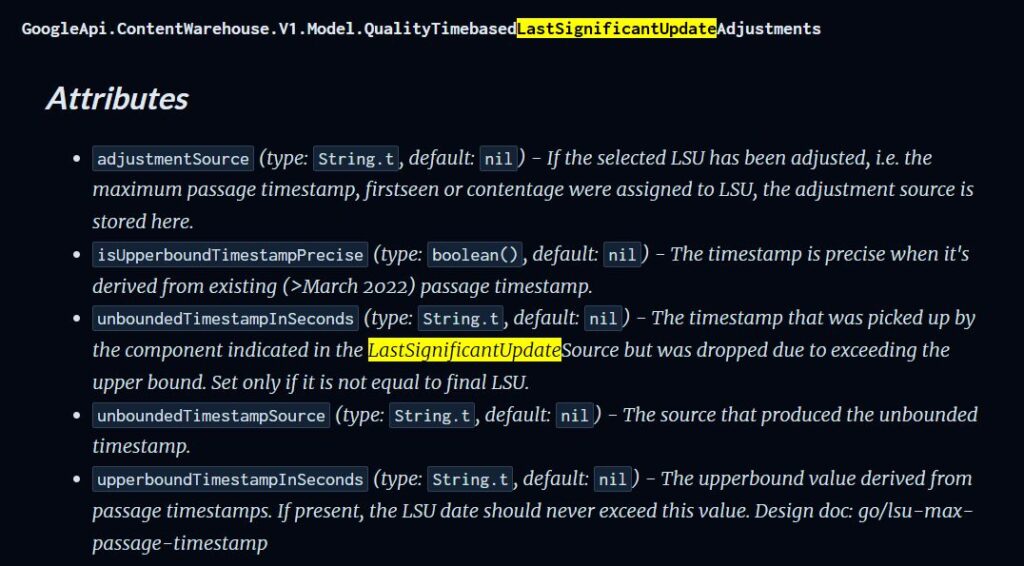
The image shows internal attributes tied to LastSignificantUpdate. This is not just “last modified date.” It’s Google’s way of tracking.
TL;DR
- Google has freshness systems designed to show newer content when a query deserves it.
- Google does not rely on a single date when estimating when a page was published or significantly updated. It uses several factors.
- Google’s public documentation does not say that changing a publication date by itself gives a ranking boost.
- Google explicitly warns against changing dates to make pages appear fresh when the content has not substantially changed.
- Leaked Google documentation contains a field called
lastSignificantUpdate, which appears to represent a significant update to a document. - The leaked documentation is evidence about Google’s internal infrastructure, not a published ranking formula.
- There is no Google-approved rule saying you should update every article monthly, quarterly or on any fixed schedule.
- The right reason to update content is that the information, examples, data, products, recommendations or usefulness have changed.
Does Google Reward Fresh Content?
Sometimes. But freshness is not a universal ranking bonus for every query.
Google’s current documentation describes several “query deserves freshness” systems. These systems are designed to show fresher content for searches where users are likely to expect recent information. Google gives examples such as a newly released movie or a recent earthquake.
That distinction is important.
Imagine someone searches:
“Google algorithm update September 2026”
Fresh information is obviously important.
Now imagine someone searches:
“What is a canonical URL?”
The basic concept does not become better simply because an article was updated yesterday.
This is why the idea that “Google rewards websites that constantly update their content” is too simplistic.
Freshness matters when freshness matters to the query.
Changing the Date Is Not the Same as Updating Content
Google is unusually clear about this.
Its people-first content guidance specifically asks publishers whether they are changing the dates of pages to make them seem fresh when the content has not substantially changed. Google also warns against adding or removing large amounts of content simply because you believe it will make your site appear fresh.
So imagine you published:
Best Laptops 2024
Two years later, you change only:
Best Laptops 2026
Then you update two sentences and hit publish.
From a CMS perspective, the page is updated.
But that doesn’t mean the information has actually become substantially more useful.
A proper refresh could involve:
- Removing discontinued laptops
- Adding current models
- Updating prices where appropriate
- Updating specifications
- Reworking recommendations
- Replacing old screenshots
- Adding new comparisons
- Removing outdated advice
- Checking external references
- Improving the page based on what searchers now need
That’s an actual content update.
What Google Officially Says About Dates
Google has a dedicated documentation page about dates shown in Search.
It says that a byline date is Google’s estimate of when a page was published or updated. More importantly, Google says it doesn’t depend on a single date factor because individual date signals can have problems. Its systems look at several factors to estimate when a page was published or significantly updated.
This changes how you should think about dates.
Don’t think:
“I changed dateModified, so Google knows my page is fresh.”
Think:
“I have provided accurate date information, and Google can use that along with other signals to estimate the page’s publication or update date.”
Google recommends providing a clear, visible date and, where appropriate, datePublished and dateModified structured-data properties. The dates should be consistent with what users can see on the page.
What Is lastSignificantUpdate?
This is where things get particularly interesting for SEOs.
Leaked documentation of Google’s Content Warehouse contains a field called:
lastSignificantUpdate
The documentation describes it as the last significant update of a document. Related fields include information about the source of the adjustment and timestamp information.
This is important evidence because it suggests that Google’s internal systems can store something more sophisticated than a simple “last modified” timestamp.
But there is an important caveat.
This comes from leaked/internal Google documentation, not from Google’s public Search Central documentation.
So we should not turn it into a fake Google ranking formula.
The safest conclusion is Google’s internal documentation appears to include mechanisms for representing significant document updates, while Google’s public documentation confirms that its systems estimate when pages are published or significantly updated.
That is interesting enough without exaggerating what we know.
What the Leaked Documentation Suggests
The lastSignificantUpdate documentation contains related attributes such as:
adjustmentSourceisUpperboundTimestampPreciseunboundedTimestampInSecondsupperboundTimestampInSeconds
These names suggest that Google’s internal systems can deal with different sources and levels of confidence around document update timestamps.
But don’t make the mistake of translating every internal field into a confirmed ranking signal.
Also read: Do Clicks Really Matter for Ranking?
For example, seeing a field related to a timestamp does not prove that if this timestamp changes, rankings will increase.
It also does not prove Google gives every meaningful update a freshness boost.
The documentation gives us clues about Google’s infrastructure.
It does not give publishers a complete ranking recipe.
That distinction matters.
What We Know vs What We Don’t Know
This is probably the most important section of the article.
| Question | What the evidence supports |
|---|---|
| Does Google have freshness systems? | Yes. Google confirms this. |
| Does Google estimate publication/update dates? | Yes. Google confirms this. |
| Does Google use one date only? | No. Google says it uses several factors. |
Does Google have a lastSignificantUpdate field internally? | It appears in leaked Google documentation. |
| Does changing the date automatically improve rankings? | Not established. |
| Does Google penalize every minor date change? | Not established. |
| Should every article be updated monthly? | No Google guidance says this. |
| Does every content update produce a freshness boost? | No. Freshness is query-dependent. |
| Is changing dates without substantial changes recommended? | No. Google explicitly warns against it. |
| Does Google crawl updated pages? | Yes, but timing varies and crawling does not guarantee ranking changes. |
This is the difference between SEO research and SEO mythology.
How Google Can Know a Page Changed
Google Search works through crawling, indexing and serving.
Googlebot discovers pages, crawls them, and Google’s systems analyze their content before information can potentially appear in Search. Google also continuously looks for new and updated pages across the web.
When a page changes, Google can eventually discover the new version.
There are also technical mechanisms that help crawlers understand whether content has changed.
For example, Google documents support for HTTP caching mechanisms such as If-Modified-Since and If-None-Match. Depending on the situation, a server can return 304 Not Modified when the content hasn’t changed, allowing Google to reuse the previously crawled version.
Sitemaps can also communicate when a URL was last modified using <lastmod>. Google describes this as a way to indicate when an indexed URL has been updated.
But these mechanisms answer an important question:
“Has this URL changed?”
They do not automatically answer:
“Is this new version better?”
Those are different problems.
A Changed Page Is Not Automatically a Better Page
Suppose you have an article about:
“Best AI SEO Tools”
You make three changes.
Update A
You change January 2026 to September 2026. Nothing else changes.
Update B
You add:
- Five new tools
- Current pricing
- New screenshots
- New features
- Updated pros and cons
Update C
You completely rewrite the article based on what users currently need.
All three pages technically changed.
But the second and third updates provide much more evidence of meaningful improvement.
That’s why you should never build an SEO strategy around the idea that the size of the date change matters more than the quality of the content change.
What Counts as a Meaningful Content Update?
There is no official Google percentage such as “Change 30% of the article and Google will consider it fresh.”
You may see numbers like that in SEO discussions, but there is no general Google rule establishing such a threshold.
Instead, ask a much better question: Did the update materially improve the page for someone searching for this information?
For example:
Weak update
- Fixing one typo
- Changing a heading
- Changing a few words
- Moving paragraphs around
- Updating only the visible date
Meaningful update
- Replacing outdated information
- Adding new developments
- Updating statistics
- Updating product information
- Removing obsolete recommendations
- Adding new examples
- Improving inaccurate explanations
- Updating screenshots
- Adding original research
- Improving comparisons
- Correcting broken or outdated internal links
The exact amount of change depends on the page.
A small factual correction may be a meaningful update for one article.
A huge rewrite may be unnecessary for another.
Does Google Learn Your Update Schedule?
This is one claim I would be careful with.
It is tempting to say “Google knows you update every 30 days and expects your next update.”
But there is no public Google guidance establishing a universal system like that.
So don’t tell readers: “Update every 30 days because Google expects it.”
There is no need.
Google’s own documentation is much more useful: update content when it needs updating and avoid changing dates simply to make content appear fresh.
Your publishing schedule should be driven by the subject.
A page about a rapidly changing product may need frequent updates.
An evergreen explanation of a basic technical concept may remain accurate for years.
The goal is not consistency for Google’s sake.
The goal is accuracy for the reader’s sake.
How Often Should You Update Content?
There is no universal schedule.
Instead, use the topic itself to determine the update cycle.
| Content type | Sensible update trigger |
|---|---|
| Evergreen guide | Important factual or industry changes |
| Statistics article | New data becomes available |
| Product comparison | Products, pricing or specifications change |
| Software guide | Features or interface change |
| SEO guide | Google’s documented guidance or the underlying practice changes |
| Industry analysis | New developments change the conclusion |
| News article | A meaningful new development occurs |
Notice that these are triggers, not deadlines.
You don’t need to open every article every 90 days and change something just because the calendar says so. Read my strategy for content pruning.
A Better Content Refresh Workflow
Here’s the process I would actually use.
1. Check whether freshness matters
Search the main query.
Look at the current results.
Ask:
- Are the top results recent?
- Does the query include a year?
- Are recent events important?
- Has the underlying topic changed?
- Would an older answer still satisfy the searcher?
If freshness isn’t important, don’t manufacture it.
2. Check your existing page
Look for:
- Outdated facts
- Old statistics
- Discontinued products
- Old screenshots
- Broken links
- Missing developments
- Weak examples
- Outdated recommendations
- New competitors
- Changes in search intent
3. Compare competing results
Don’t simply copy what ranking pages contain.
Look for information your page is missing.
Your goal should be to make the page more useful, not merely more similar.
4. Update the actual content
Add, remove or rewrite information where necessary.
Sometimes the best update is adding new material.
Sometimes it’s deleting outdated material.
Sometimes the entire article needs restructuring.
5. Update the date accurately
If the page has been meaningfully updated, make the visible date clear.
Google recommends using appropriate visible dates and consistent structured data such as datePublished and dateModified when applicable.
Don’t change the date just because you made a cosmetic edit.
6. Make the change discoverable
Google recommends practical methods such as maintaining sitemaps and requesting recrawling when appropriate. Its documentation also says that crawling and indexing can take time.
Don’t expect:
Update → Request indexing → Ranking tomorrow
Search doesn’t work that predictably.
7. Measure the result
After enough time has passed, compare:
- Impressions
- Clicks
- CTR
- Average position
- Queries
- Landing pages
- Conversions
Look for meaningful changes rather than judging the update after a day or two.
Google itself notes that changes can take days or, in some cases, considerably longer to show an effect in Search.
Don’t Confuse Crawling With Ranking
This is another important distinction.
Your page can be:
Updated → Crawled → Indexed
without:
Updated → Higher rankings
Google’s crawling documentation explains that updated pages may take time to be crawled and indexed, and that being crawled does not guarantee that a page will appear in Search.
Ranking is a separate process.
Google’s systems evaluate relevance and usefulness for the searcher’s query along with many other factors.
So if you update an article and Google crawls it the next day, that does not mean Google has decided:
“This page deserves a ranking boost.”
It simply means Google has discovered or processed the updated version.
What About Google’s Freshness Systems?
This is where the whole topic comes together.
Google officially says it has freshness systems designed for queries where fresh information is expected.
That means freshness is best understood as context-dependent.
Consider these searches:
“Latest Google Search update”
Freshness is highly relevant.
“How does robots.txt work?”
Freshness is less important because the basic concept is relatively stable.
“Best smartphones September 2026”
Current products and prices matter.
“What is HTTP status code 301?”
The fundamental explanation doesn’t need to change every month.
So don’t ask “How often should I update this page?”
Ask “What has changed that makes this page more useful today than it was before?”
That is the better SEO question.
What You Should Not Do
Don’t change dates without meaningful changes
Google explicitly warns against changing dates to make content appear fresh when the content has not substantially changed.
Don’t update every article on a fixed schedule
There is no universal Google rule requiring monthly or quarterly updates.
Don’t add random paragraphs just to increase the word count
Google’s people-first guidance explicitly says there is no preferred word count.
Don’t remove useful content just because it is old
Age alone doesn’t make information useless.
An old article can still be accurate and valuable.
Don’t assume every update should improve rankings
Google says there is no guarantee that changes to your website will produce a noticeable impact in Search.
Don’t treat a new date as proof of freshness
The date is only one part of the picture.
A Simple Content Update Checklist
Before changing an article’s date, ask:
- Is the information still accurate?
- Has the subject changed?
- Are any statistics outdated?
- Are the examples still relevant?
- Are any products or tools discontinued?
- Does the current SERP show new search intent?
- Are competitors answering important questions I missed?
- Can I add original information?
- Can I remove obsolete information?
- Do screenshots need updating?
- Do internal links need updating?
- Does the visible date accurately describe the change?
- Does
dateModifiedmatch the visible information?
If you can’t identify a meaningful improvement, you probably don’t need to change the article’s date.
The Bigger SEO Lesson
The biggest mistake is thinking about freshness as a trick. It isn’t.
Google’s public guidance points in a much simpler direction: create helpful, reliable, people-first content and don’t manipulate dates or content simply to make a site appear fresh.
Its ranking documentation confirms that freshness systems exist, but only for queries where freshness is useful.
And its date documentation explains that Google uses several factors to estimate when a page was published or significantly updated rather than relying on one timestamp.
The leaked lastSignificantUpdate documentation adds an interesting technical layer to that picture, but it should be treated as evidence about Google’s internal systems, not a public ranking formula.
That’s the distinction many SEO articles miss.
Final Takeaway
Don’t update content because the calendar says it’s time.
Don’t change the date because your competitor has a newer date.
Don’t rewrite 500 words just so WordPress gives you a new modification timestamp.
Instead, ask one question:
What has changed that makes this page more useful to the person searching today?
If the answer is something meaningful, update the page.
If nothing has changed, leave it alone.
Freshness is not about making an old URL look new.
It’s about making old information useful again.
FAQs
Does Google reward fresh content?
Not universally. Google has freshness systems designed to show fresher content for queries where users are likely to expect recent information.
Does changing the publication date improve rankings?
There is no public Google guidance saying that changing a publication date by itself improves rankings. Google explicitly warns against changing dates to make content appear fresh when the content has not substantially changed.
How does Google know when a page was updated?
Google says it uses several factors to estimate when a page was published or significantly updated rather than relying on one date.
What is lastSignificantUpdate?
lastSignificantUpdate is a field documented in leaked Google Content Warehouse material that appears to represent the last significant update of a document. It should be treated as evidence about Google’s internal infrastructure, not as a publicly documented ranking formula.
How often should I update old content?
There is no universal schedule. Update a page when its information, examples, data, products, recommendations or usefulness have materially changed.
Should I update the date every time I edit an article?
No. Minor edits do not necessarily justify changing the publication or update date. The date should accurately represent when the page was published or meaningfully updated.
Does updating old content improve Google rankings?
It can, but there is no guarantee. Google says changes can take time to affect Search and that there is no guarantee a website change will produce a noticeable ranking impact.
Is content freshness a ranking factor?
Google has dedicated freshness systems, but freshness is query-dependent. It is more important for searches where users expect recent information than for stable, evergreen topics.
Should I request indexing after updating content?
You can request recrawling when appropriate, but it does not guarantee faster ranking improvements. Google recommends practical methods such as keeping sitemaps updated and requesting recrawls when needed.

I am an SEO specialist with more than 7 years of hands-on experience in SEO, organic content marketing, technical SEO, and social media. I have an engineering degree, giving me an unusual combination of technical understanding and digital marketing expertise. Know more about me.
Pingback: Content Pruning: How to Audit and Remove Low-Value Content - SEO is my Love
Pingback: How to Rank Higher Without SEO Hacks