Google has announced a change to the way its Search systems extract JSON-LD structured data from HTML.
Google Changes JSON-LD Parsing: Double-Escaped HTML Entities Will No Longer Be Unescaped
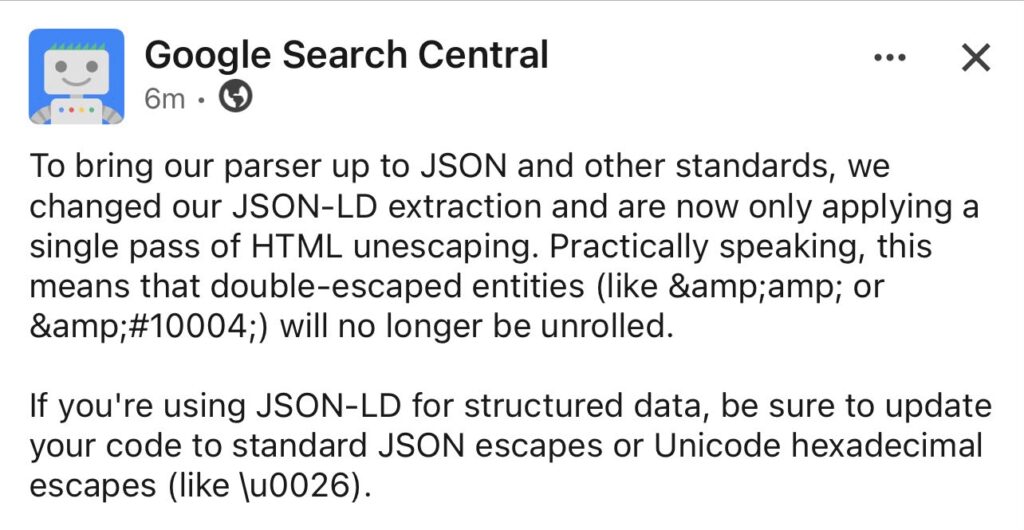
Table of Contents
The change is focused on HTML entity unescaping. Google says its parser will now perform only a single pass of HTML unescaping when extracting JSON-LD.
That means websites relying on double-escaped HTML entities in their JSON-LD may need to update their structured data implementation.
What did Google change?
Google Search Central said it changed its JSON-LD extraction process to bring its parser closer to JSON and other standards.
Previously, Google’s extraction process could effectively continue unescaping HTML entities that had been escaped more than once.
That behavior is changing.
Google now applies a single pass of HTML unescaping.
In simple terms, if a character has been escaped twice, Google will no longer keep decoding it until it reaches the final character.
Google specifically highlighted examples such as:
&✔
These are examples of double-escaped entities.
Under the updated behavior, they will no longer be repeatedly “unrolled” by Google’s JSON-LD extraction process.
What does double escaping mean?
This is easier to understand with an example.
Suppose you want to represent an ampersand (&) in HTML.
An HTML entity for an ampersand is:
&If that entity is escaped again, it can become:
&The important difference is that these are not equivalent strings.
With Google’s new single-pass behavior, & is decoded once to:
&It is not decoded a second time into:
&The same principle applies to numeric HTML entities.
For example:
✔may previously have been unescaped repeatedly to produce the check-mark character represented by ✔.
With the new parser behavior, Google will stop after the first unescaping pass.
Why does this matter for SEO?
JSON-LD is one of the most widely used ways to provide structured data to Google.
Websites use it to describe things such as:
- Articles
- Products
- Reviews
- Organizations
- Local businesses
- Events
- Breadcrumbs
- FAQs
- Recipes
- Software applications
If your JSON-LD contains improperly or unnecessarily double-escaped values, Google’s parser may now interpret those values differently.
This doesn’t mean that every website using JSON-LD needs to make changes.
The issue is primarily relevant to implementations that generate double-escaped HTML entities inside JSON-LD.
Google recommends standard JSON escaping
Google’s guidance is straightforward: if you’re using JSON-LD for structured data, update your implementation to use standard JSON escapes or Unicode hexadecimal escapes.
For example, Unicode escaping can represent an ampersand as:
\u0026This is a JSON escape rather than an HTML entity.
The important point is that your JSON-LD should contain valid JSON and should not depend on Google repeatedly decoding HTML entities.
What should SEOs check?
If you’re an SEO, you don’t necessarily need to rewrite every schema implementation on your website.
Instead, check how your structured data is generated.
1. Inspect the raw HTML
Open the page source and find the JSON-LD block:
<script type="application/ld+json">
{
  "@context": "https://schema.org",
  ...
}
</script>
Look for suspicious values containing sequences such as:
&amp;or:
&#These can indicate that a value has been escaped more than once.
2. Check your schema generator
The problem may not be in the schema itself.
It could be introduced by:
- A WordPress plugin
- A custom schema generator
- A JavaScript framework
- A server-side template
- A CMS
- A third-party structured-data tool
- Custom PHP or JavaScript code
If your CMS generates JSON-LD automatically, check whether the latest version of the software already addresses the issue.
3. Validate the JSON itself
JSON-LD needs to contain valid JSON.
Don’t confuse HTML escaping with JSON escaping.
For example, JSON uses backslash-based escaping for characters that need it:
{
  "name": "Example \u0026 Company"
}
HTML entities such as & belong to the HTML layer, while \u0026 is a JSON escape.
Mixing the two incorrectly can create parsing problems.
4. Test your structured data after making changes
After updating the implementation, validate the resulting structured data.
Check that:
- The JSON is valid.
- Required properties are present.
- Values are interpreted correctly.
- The schema type is correct.
- URLs are not malformed.
- Important text fields contain the intended characters.
Also check Google Search Console for structured-data-related issues after deployment.
Should you change every & in JSON-LD?
No.
This announcement should not be interpreted as “remove every HTML entity from JSON-LD.”
The important issue is double escaping.
A normal HTML-escaped value and a double-escaped value are not the same thing.
The safest approach is to inspect how your JSON-LD is generated and make sure the final output conforms to standard JSON escaping rather than relying on multiple rounds of HTML entity decoding.
What does this mean for WordPress websites?
WordPress websites deserve particular attention because structured data can be generated by several different systems at the same time.
For example, a site might have:
- An SEO plugin generating Article schema
- WooCommerce generating Product schema
- A theme adding Organization schema
- Elementor or another builder adding custom structured data
- Custom code adding additional JSON-LD
If one of these systems double-escapes values, the resulting HTML could contain problematic sequences.
You don’t need to assume that your site is affected.
Instead, inspect the actual rendered HTML.
This is especially important if you have custom schema code.
A simple example
Imagine your JSON-LD contains a company name:
{
  "name": "Example & Company"
}
Depending on where the JSON is being embedded, developers may introduce escaping at different layers.
A poorly handled process could eventually produce something like:
Example &amp; CompanyThat is where the new Google behavior becomes important.
The parser will not keep decoding the value indefinitely.
Your goal should be to make sure the final JSON-LD is correctly generated in the first place.
Is this a Google ranking update?
No.
This announcement is about JSON-LD extraction and parsing, not a new ranking algorithm.
There is no indication from the announcement that Google is introducing a ranking penalty for websites that use double-escaped entities.
However, if malformed structured data prevents Google from correctly understanding your markup, it could affect the eligibility or interpretation of structured-data features.
That’s why technical SEOs should treat this as a structured-data implementation issue, rather than a traditional ranking update.
The bigger SEO lesson
This change highlights an important technical SEO principle:
Don’t build structured data around Google’s historical parser behavior.
Your JSON-LD should follow standard JSON syntax and use appropriate escaping.
If your implementation only works because Google previously performed multiple rounds of HTML unescaping, it was relying on parser behavior rather than clean structured-data code.
Google is now tightening that behavior.
For most websites, there may be nothing to do.
But if you manage large websites, custom schema implementations, programmatic SEO platforms, or complex CMS templates, this is worth checking.
Quick checklist for SEOs
- Inspect rendered JSON-LD on important templates.
- Search for double-escaped entities such as
&amp;. - Check custom schema generators.
- Check WordPress plugins that generate structured data.
- Make sure JSON-LD uses valid JSON escaping.
- Consider Unicode escapes such as
\u0026where appropriate. - Validate the final structured data.
- Monitor Google Search Console after deployment.
Final takeaway
Google has changed its JSON-LD extraction behavior so that it performs one pass of HTML unescaping instead of repeatedly unescaping double-escaped entities.
For most websites, this may have no visible impact.
But websites with custom or poorly escaped JSON-LD should review their implementation.
The safest approach is simple: generate valid JSON-LD using standard JSON escaping and don’t rely on Google to repeatedly decode HTML entities for you.
This is a small technical change, but it is exactly the kind of change technical SEOs should catch before it turns into a structured-data debugging problem.

I am an SEO specialist with more than 7 years of hands-on experience in SEO, organic content marketing, technical SEO, and social media. I have an engineering degree, giving me an unusual combination of technical understanding and digital marketing expertise. Know more about me.