
First of all, check if your content is behind JavaScript by inspecting the page in Chrome.
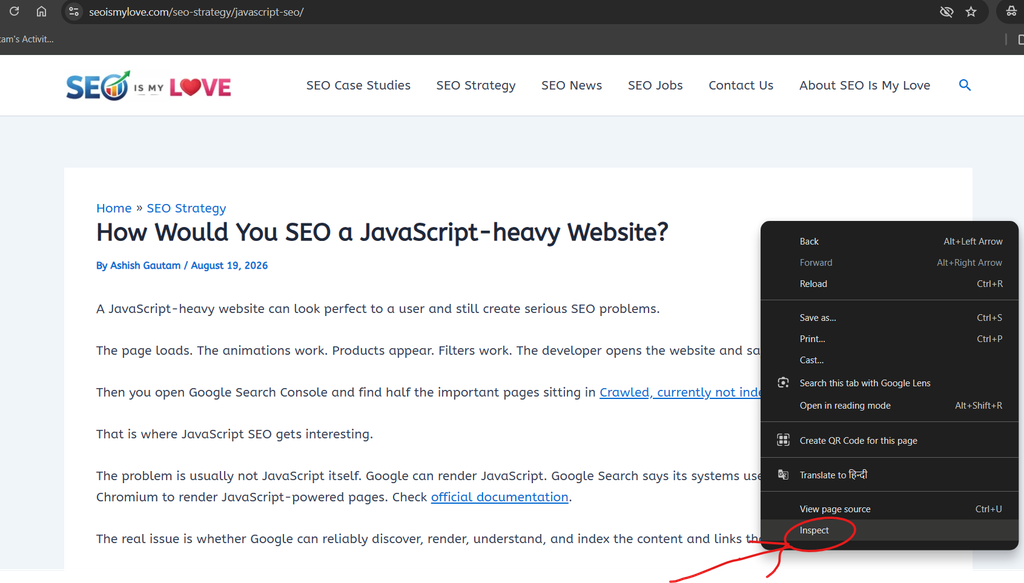
Right-click on the page or article that you want to inspect. Then click on Inspect as shown in the image below.
Now use the keyboard and press CTRL+Shift+P.
Now search for JavaScript and select the Disable JavaScript option as shown in the image below.
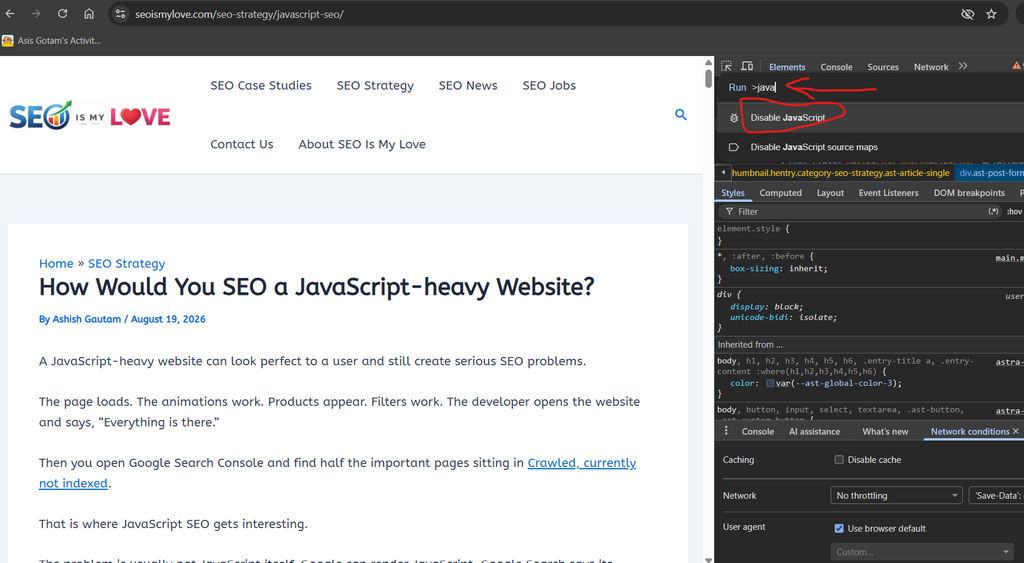
Now refresh/reload the page and see if any important content, links, or CTA buttons are not visible. If they are not visible, you need to work on JavaScript SEO.
You can also check if your content is accessible to AI crawlers or not.
Table of Contents
A JavaScript-heavy website can look perfect to a user and still create serious SEO problems.
The page loads. The animations work. Products appear. Filters work. The developer opens the website and says, “Everything is there.”
Then you open Google Search Console and find half the important pages sitting in Crawled, currently not indexed.
That is where JavaScript SEO is important.
The problem is usually not JavaScript itself. Google can render JavaScript. Google Search says its systems use an evergreen version of Chromium to render JavaScript-powered pages. Check official documentation.
The real issue is whether Google can reliably discover, render, understand, and index the content and links that JavaScript creates.
So, if I had to SEO a JavaScript-heavy website, I would not start by telling the development team to remove JavaScript.
I would start by analyzing what Google actually receives, renders, and indexes from this website.
First, Understand How Google Processes JavaScript
Google describes JavaScript processing in three stages:
Crawling → Rendering → Indexing
During crawling, Googlebot requests the URL and processes the initial HTML.
Google then queues pages for rendering. Its Web Rendering Service executes JavaScript using a browser environment similar to a modern browser.
Google uses the rendered HTML to understand the final page and discover additional links. The page then moves through indexing.
This creates an important distinction.
A browser loading the page successfully does not automatically prove that Google can understand everything on that page.
Your browser may execute every script without complaint.
Google may encounter a failed API request, blocked resource, rendering error, incorrect routing, missing content, or an implementation that produces a different result.
That is why “it works in Chrome” is not an SEO test.
1. Check the Raw HTML First
My first technical check would be the raw HTML response.
Open an important URL and compare View Source with the rendered page in the browser.
If the source contains the actual page content, title, canonical, links, and other important elements, that is generally a healthier starting point.
If the source looks something like this while the browser eventually displays thousands of words, products, links, and metadata, the page depends heavily on JavaScript rendering.
<div id="root"></div>
<script src="/app.js"></script>
That does not automatically mean the page cannot rank. Google can render JavaScript. But it means I would investigate the rendering process carefully.
Google itself recommends server-side rendering or pre-rendering as a good approach because it can make websites faster for users and crawlers, and not all bots can execute JavaScript.
2. Use Google Search Console URL Inspection
Next, I would test important URLs using the URL Inspection Tool in Google Search Console.
I would inspect:
- Homepage
- Main category pages
- Important service pages
- Product pages
- Blog posts
- High-value landing pages
- A few pages that are not indexed
I want to compare what users see with what Google can process.
Google’s JavaScript SEO documentation specifically recommends using URL Inspection and the Rich Results Test to check the rendered HTML of JavaScript-based pages.
This is one of the most valuable steps because it turns an argument between SEO and development into an evidence-based investigation.
3. Make Important Content Available Without Depending Entirely on JavaScript
If a page is important for organic search, I want its core content to be available as HTML whenever practical.
That includes things such as:
- Main heading
- Primary text
- Product information
- Category descriptions
- Important internal links
- Canonical URL
- Metadata
- Structured data where appropriate
This is one reason server-side rendering and static generation can be valuable.
With server-side rendering, the server generates HTML before sending it to the browser.
With static generation, pages can be generated ahead of time and served as HTML.
Client-side rendering can still work, but it creates more dependency on JavaScript execution.
The goal is not to eliminate JavaScript.
The goal is to avoid making critical SEO information unnecessarily dependent on JavaScript execution.
4. Choose the Right Rendering Strategy
This is probably the biggest architectural decision in JavaScript SEO.
Client Side Rendering
With CSR, the browser receives a relatively minimal HTML document, and JavaScript builds much of the page.
This works extremely well for highly interactive applications.
But it creates more SEO dependencies.
If JavaScript fails, the content may fail to appear.
Server Side Rendering
With SSR, the server generates the HTML for the requested page.
The crawler receives meaningful HTML immediately.
This can make SEO and performance easier to manage, although the exact implementation still matters.
Static Site Generation
SSG generates pages ahead of time.
This can work particularly well for:
- Blogs
- Documentation
- Guides
- Marketing pages
- Evergreen content
Hybrid Rendering
Many modern frameworks allow different rendering approaches for different routes.
That is often the most practical solution.
A dashboard does not need the same SEO architecture as a product page.
A private account page does not need to rank.
A product category does.
So I would check which URLs need search visibility and which rendering method is most reliable for those URLs.
I explained SSR and CSR in another article in detail, and which is better for SEO.
5. Fix JavaScript-Generated Links
Internal linking is critical for SEO.
Google recommends using normal HTML links with a real href attribute.
For example:
<a href="/products/laptops">Laptops</a>Google can also discover links inserted through JavaScript if they use the appropriate HTML structure.
What I would avoid is building important navigation around JavaScript actions such as:
<a onclick="loadProduct()">Product</a>or:
<a href="javascript:goToProduct()">Product</a>Google recommends crawlable links with resolvable URLs. This matters enormously on JavaScript applications.
If your category pages, product pages, articles, or services can only be reached after clicking a JavaScript event that does not expose a proper URL, you have created a discoverability problem.
6. Be Careful With SPA Routing
Single Page Applications often use client-side routing. That is fine.
The SEO problem appears when the routing system does not create proper URLs.
Google recommends using the History API for client-side routing rather than relying on URL fragments to load different pages.
For example, this is a poor approach for separate pages:
example.com/#/productsA better URL structure is:
example.com/productsEach important page should have a unique, meaningful URL that can be requested directly.
If I paste the URL into a new browser window, the correct page should load.
If the page only works after navigating through the application, I would investigate it immediately.
7. Check HTTP Status Codes
JavaScript applications sometimes create another technical SEO problem.
Everything appears to return 200 OK. Even pages that do not exist. That can create soft 404s.
Imagine this URL:
example.com/products/this-product-does-not-existThe application loads a normal page shell and returns HTTP 200.
The user sees product not found. But the server told Google 200 OK, here is a valid page.
Google’s JavaScript SEO documentation specifically discusses soft 404 problems in client-side rendered applications and recommends strategies such as redirecting to a server-returned 404 page or adding noindex to error pages.
I would therefore test:
- Nonexistent products
- Deleted articles
- Invalid category URLs
- Broken routes
- Old URLs
A proper nonexistent URL should behave like a nonexistent URL.
8. Make Metadata Stable
JavaScript can also modify metadata after the initial HTML response.
That can affect:
- Title tags
- Meta descriptions
- Canonical tags
- Robots directives
- Open Graph tags
- Structured data
I would check whether important metadata exists in the initial HTML and whether the rendered version changes it.
For example, if every product page initially sends:
<title>Loading...</title>And JavaScript later changes it to the actual product name, I would investigate the implementation.
The same applies to canonical tags.
If JavaScript generates or changes canonical URLs inconsistently, you can create a serious indexing problem.
The safest architecture is to make critical metadata predictable and consistent.
9. Check Lazy Loaded Content
Lazy loading can improve performance.
But developers sometimes make the mistake of loading important content only after a user interaction.
For example:
- Content appears after clicking a button
- Products load only after scrolling
- Reviews appear only after interaction
- Internal links appear only after a JavaScript event
Google can process JavaScript, but that does not mean every interaction-driven implementation is ideal for search.
I would make sure important content is available in the rendered page without requiring an unnecessary user interaction.
Google’s Search guidance also recommends making content immediately visible to users when you want it to be understood for certain search features, rather than hiding important content behind interactions.
10. Check JavaScript Errors and Failed API Requests
This is where technical SEO and development finally become best friends.
Open Chrome DevTools and check the Console and Network tabs.
Look for:
- JavaScript errors
- Failed API calls
- 404 JavaScript files
- 500 API responses
- Blocked resources
- CORS problems
- Timeout errors
- Authentication requirements
Suppose the product page gets its product description from an API.
The browser requests:
/api/product/123The API works for normal users but fails under certain conditions.
The browser may show an incomplete page.
Google’s renderer can only process what it successfully retrieves and executes. Google’s recent explanation of Googlebot emphasizes that the Web Rendering Service processes the resources the crawler successfully fetched.
So I would investigate whether all the important resources required to construct the page actually work.
11. Check robots.txt Carefully
A JavaScript website can depend on JavaScript, CSS, APIs, images, and other resources.
If important resources are blocked, rendering or understanding the page can suffer.
Google’s Search documentation identifies robots.txt restrictions as one possible reason Googlebot cannot access required resources or pages.
I would therefore inspect:
/robots.txtAnd check whether important resources or URLs are unnecessarily blocked.
Do not blindly unblock everything.
Instead, identify what Google actually needs to fetch and what should remain restricted.
12. Optimize JavaScript Performance
JavaScript can affect SEO indirectly through performance.
A large JavaScript bundle can take longer to download, parse, and execute.
That can affect how quickly users see and interact with the page.
I would look at:
- JavaScript bundle size
- Unused JavaScript
- Third-party scripts
- Long main thread tasks
- Code splitting
- Caching
- Image loading
- API response times
- Core Web Vitals
Google’s documentation notes that server-side or pre-rendering can make websites faster for users and crawlers.
But I would not blindly remove every JavaScript file because an SEO checklist told me to.
The goal is efficient JavaScript, not zero JavaScript.
13. Be Careful With Structured Data
JavaScript can generate structured data.
Google supports JavaScript-generated structured data, but it should be implemented and tested correctly.
For example, an ecommerce website might generate Product structured data dynamically.
I would verify that Google can actually see the required structured data in the rendered page.
Then I would validate it using Google’s relevant testing tools.
For products, I would also be careful with dynamically generated information such as price and availability.
If the structured data depends on an API that fails or returns stale information, your implementation can become unreliable.
Also check: How to Handle Faceted Navigation URLs for E-commerce SEO.
14. Don’t Automatically Move Everything to SSR
This is an important point.
When an SEO finds a JavaScript-heavy website, the easiest recommendation is often to move the entire website to SSR.
I would not make that recommendation without an audit.
SSR can be an excellent solution. But it can also require significant development work, infrastructure changes, caching changes, and architectural decisions.
First find the actual problem.
- Maybe the site already renders correctly and only has broken internal links
- Maybe the main issue is that important URLs return soft 404s
- Maybe the content is present in rendered HTML but canonical tags are wrong
- Maybe the application has an API failure
Fix the real problem first.
Google itself says JavaScript is not inherently an obstacle to Search. Its current documentation focuses on making JavaScript applications discoverable and correctly processed rather than avoiding JavaScript altogether.
My JavaScript SEO Audit Process
If I were responsible for a JavaScript SEO, I would audit it in this order.
Step 1: Map the important URLs
Identify which pages actually need organic traffic.
Step 2: Compare raw and rendered HTML
Find out what exists before and after JavaScript execution.
Step 3: Inspect URLs in Search Console
Check indexed and non-indexed examples.
Step 4: Test internal links
Make sure important pages have crawlable <a href> links.
Step 5: Test routing
Confirm that every important page has a unique, direct URL.
Step 6: Check HTTP status codes
Especially for deleted and nonexistent URLs.
Step 7: Check metadata
Verify titles, canonicals, robots directives, and other important tags.
Step 8: Check rendering errors
Review JavaScript errors, API requests, and blocked resources.
Step 9: Review performance
Investigate JavaScript execution, Core Web Vitals, and unnecessary scripts.
Step 10: Choose the right rendering architecture
Use CSR, SSR, SSG, or a hybrid approach based on the requirements of each page type.
That sequence matters.
It prevents an SEO team from prescribing an expensive architectural rebuild before proving that the existing architecture is actually causing the problem.
What I Would Tell a Development Team
I would not walk into the development meeting and say JavaScript is bad for SEO.
That statement is simply too broad.
I would say JavaScript is fine. We need to make sure Google can reliably discover, render, understand, and index the pages that matter.”
That gives developers something they can actually work with.
The SEO requirements become concrete:
- Important content must be accessible
- Important links must be crawlable
- Important URLs must work directly
- Metadata must be consistent
- Nonexistent pages must return the correct status
- JavaScript must not hide critical content from the rendering process
- And the rendering architecture should match the SEO requirements of the site
Conclusion
JavaScript SEO is not about fighting JavaScript. It is about removing unnecessary dependencies between JavaScript execution and search visibility.
Google can render JavaScript, and its current documentation confirms that JavaScript powered websites can be discovered and indexed. But Google also recommends server side or pre rendering as a strong option because it can make sites faster and less dependent on client side execution.
So my approach would be simple:
- Find what Google receives
- Find what Google renders
- Find what Google indexes
- Then compare that with what users see
If those versions are substantially different, you have found your SEO investigation.
A JavaScript framework is not the enemy.
An empty HTML shell, broken rendering, inaccessible links, unstable metadata, incorrect status codes, and content that only appears after fragile JavaScript execution are the real problems.
And that is the mindset I would use to SEO a JavaScript-heavy website.

I am an SEO specialist with more than 7 years of hands-on experience in SEO, organic content marketing, technical SEO, and social media. I have an engineering degree, giving me an unusual combination of technical understanding and digital marketing expertise. Know more about me.
Pingback: SSR or CSR: Which is Better for SEO?
Pingback: SEO Salary based on Role, Experience, Skills, and Location
Pingback: How to Rank Higher Without SEO Hacks