
Let’s look at 15 common SEO reporting mistakes that can make even a technically correct report misleading or useless.
1. Reporting keyword rankings as the biggest SEO achievement
This is probably one of the most common mistakes in SEO reporting.
Imagine sending a client a report showing that 50 keywords improved their rankings this month.
Sounds impressive, right?
But what if those keywords have almost no search demand? What if they rank for informational queries that have nothing to do with the company’s products? What if none of those rankings generate qualified visitors?
A keyword moving from position 45 to position 12 may look like a major achievement in a report. However, it might generate no additional clicks.
On the other hand, a commercial keyword moving from position 5 to position 3 could have a much greater business impact.
The problem is not keyword tracking. The problem is treating ranking improvements as business results.
What to do instead:
Report rankings alongside:
- Search impressions and clicks.
- Organic landing-page traffic.
- Search intent and keyword relevance.
- Leads, sales or other meaningful conversions.
- Changes in visibility for important commercial keywords.
You can still show ranking improvements, but explain why those improvements matter.
2. Showing impressions growth without checking clicks
Here is another report that looks impressive:
| Metric | Previous month | Current month | Change |
|---|---|---|---|
| Impressions | 100,000 | 150,000 | +50% |
| Clicks | 8,000 | 7,500 | -6.25% |
| CTR | 8% | 5% | -3% |
An SEO professional might highlight the 50% increase in impressions.
But look at the other numbers.
The website appeared in Google Search more often, yet received fewer clicks. Its click-through rate also declined.
What happened?
There could be several explanations:
- The website started appearing for more low-ranking queries.
- New keywords generated impressions but very few clicks.
- Rankings changed for important search terms.
- Search results features affected click behaviour.
- The title and description no longer attracted as many clicks.
Impression growth is useful, but it does not automatically mean that SEO performance improved.
What to do instead:
Always analyse impressions, clicks, and CTR together.
When impressions increase, but clicks decline, identify which queries and pages caused the change. Do not celebrate the impression increase without investigating the lost clicks.
3. Comparing month-over-month data without considering seasonality
This is a mistake that can make perfectly normal traffic changes look like SEO failures.
Imagine an e-commerce website selling Christmas decorations.
December brings strong demand. January naturally sees a decline.
If you compare December with January, organic traffic may fall significantly.
Does that mean SEO stopped working?
Not necessarily.
The decline could simply reflect seasonal demand.
The same problem happens with:
- Tax-related websites during filing seasons.
- Education websites during admission periods.
- Travel websites during holiday seasons.
- Shopping websites during major sales.
- Event-related websites after an event ends.
Month-over-month comparisons are useful for monitoring short-term changes, but they do not always provide the full picture.
What to do instead:
Use the right comparison for the business:
- Month over month: Understand recent performance changes.
- Year over year: Identify seasonal patterns.
- Quarter over quarter: Review broader performance trends.
- Longer periods: Understand the overall direction of organic growth.
For example, comparing January 2026 with January 2025 may tell you more about an e-commerce website’s organic performance than comparing January with December.
Also check whether the reporting periods contain the same number of days and comparable business activity.
4. Comparing Google Search Console clicks with GA4 organic sessions as if they were the same metric
I have seen SEO reports where someone compares Google Search Console clicks with Google Analytics sessions and labels the difference as missing organic traffic.
That is not a correct comparison.
Google Search Console and Google Analytics measure different things.
Search Console records clicks from Google Search. GA4 records website activity through its measurement system.
One user can generate multiple page views during a session. Some clicks may not become measurable sessions. Tracking consent, JavaScript issues, redirects, tagging problems, and differences in processing can also affect the numbers.
For example:
| Metric | Previous month | Current month |
|---|---|---|
| GSC clicks | 10,000 | 12,000 |
| GA4 organic sessions | 8,500 | 10,000 |
These numbers do not need to match.
Google itself explains that Search Console clicks and Analytics sessions have different measurement methods and that some difference is expected.
What to do instead:
Use each platform for the job it is designed to do.
| Tool | What to analyse |
|---|---|
| Google Search Console | Impressions, clicks, CTR, average position, search queries and pages |
| GA4 | Organic sessions, engagement, landing pages, conversions and user behaviour |
| CRM | Qualified leads, sales opportunities and closed deals |
| SEO tools | Keyword tracking, backlinks, competitor visibility and technical monitoring |
If the difference between clicks and sessions becomes unusually large, investigate it rather than assuming one platform is reporting incorrectly.
5. Showing total organic traffic without separating branded and non-branded traffic
Imagine a company launches a television advertising campaign.
More people start searching for its brand name.
Its branded organic searches increase, and total organic traffic grows by 40%.
The SEO report highlights this as a major SEO achievement.
But did SEO actually generate that additional demand?
Not necessarily. The increase may have come from advertising, public relations, offline campaigns or growing brand awareness.
This is why combining branded and non-branded organic performance can hide important information.
Branded searches show how people find a company when they already know its name. Non-branded searches help show how the website attracts people who are discovering it through broader search queries.
Both matter, but they tell different stories.
What to do instead:
Separate queries into:
- Branded searches.
- Non-branded searches.
- Product or service searches.
- Informational searches.
- Navigational searches.
For example, a website selling project management software could separate:
- Brand name searches.
- Best project management software.
- Project management software pricing.
- How to manage a project.
This makes it easier to understand where organic visibility is growing.
Remember that query classification is not always perfect. Some queries are ambiguous, so keep an unclassified category rather than forcing every query into a group.
6. Reporting total website traffic instead of organic traffic
This one sounds obvious, but it still happens.
An SEO report shows that website traffic increased from 50,000 to 70,000 visitors.
The client is happy.
But where did those additional visitors come from?
| Channel | Previous month | Current month |
|---|---|---|
| Organic Search | 20,000 | 18,000 |
| Paid Search | 10,000 | 20,000 |
| Direct | 12,000 | 17,000 |
| Social | 8,000 | 15,000 |
| Total | 50,000 | 70,000 |
Total traffic increased by 40%, but organic traffic actually declined.
If you present total traffic as an SEO achievement, you are giving the wrong impression.
What to do instead:
Keep organic search performance separate from other acquisition channels.
Show total website traffic only when it provides useful business context. Clearly label the source of every metric.
7. Showing average keyword position without explaining what it means
Average position is one of the most misunderstood metrics in Google Search Console.
A report might show:
| Month | Average position |
|---|---|
| Previous month | 8.5 |
| Current month | 6.2 |
The report says rankings improved by 2.3 positions.
But this number does not mean every keyword improved by 2.3 positions.
Search Console calculates average position using the topmost position occupied by your property in the relevant search results, averaged across impressions.
A website can gain impressions for many new queries at lower positions and see its average position decline, even when some important keywords improve.
The reverse can also happen.
Average position is useful for observing broad trends, but it should not be treated as a precise ranking measurement for every keyword.
What to do instead:
Analyse:
- Average position by important query.
- Position changes for priority landing pages.
- Brand versus non-brand performance.
- Country and device differences.
- Search impressions and clicks alongside position.
If you want to track a fixed set of keywords, use a consistent rank-tracking setup and document the location, device, and search engine settings.
8. Hiding traffic drops behind positive metrics
Not every SEO month will be successful.
Sometimes traffic drops, rankings decline, important pages lose impressions, or conversions fall.
The mistake is not experiencing a decline. The mistake is hiding it inside a report.
For example:
An SEO report highlights:
- 25 new keywords ranking.
- 15 new backlinks.
- 20 refreshed articles.
- 10 technical issues fixed.
But organic clicks declined by 30%.
The report focuses on completed tasks instead of explaining the performance decline.
This creates a trust problem.
Clients and managers do not expect every metric to increase every month. They do expect honest reporting.
What to do instead:
If performance declines, explain:
- What declined?
- Which pages or queries were affected?
- When did the decline begin?
- What possible causes have been identified?
- What evidence supports those explanations?
- What actions will you take next?
Do not blame every decline on a Google algorithm update. Check seasonality, technical changes, competitors, search demand, tracking issues, and affected page groups first.
If the cause is not confirmed, say so.
An honest explanation is better than a confident but unsupported excuse.
9. Reporting completed SEO tasks as SEO results
Publishing 20 articles, building 50 backlinks and fixing 100 technical issues may sound like a successful month.
But these are activities and deliverables, not necessarily outcomes.
For example, publishing 20 articles does not prove that the website gained organic visibility.
Building 50 backlinks does not prove that the website gained qualified traffic.
Fixing 100 warnings does not mean that rankings improved.
This is where SEO reporting often becomes a task-completion report rather than a performance report.
What to do instead:
Separate work completed from performance achieved.
| Activities completed | Performance to measure |
|---|---|
| Published 20 articles | Organic clicks and impressions to those articles |
| Updated 15 old pages | Changes in visibility and organic traffic |
| Built relevant links | Referral traffic and changes in link profile |
| Fixed crawl issues | Crawl accessibility and indexation outcomes |
| Improved product pages | Organic visits and product conversions |
You should report the work because stakeholders need to know what the SEO team delivered.
But never present the number of tasks completed as proof of business growth.
10. Reporting conversions without checking their quality
Imagine your SEO report shows that organic leads increased from 50 to 100.
That looks like a 100% improvement.
But what if 70 of those leads are spam submissions?
Or what if most enquiries come from people outside the company’s target market?
The conversion count has increased, but the business may not have received more valuable opportunities.
This problem often occurs when SEO professionals rely only on the conversion events configured in GA4.
An event can be counted as a conversion even when it does not represent a qualified business opportunity.
What to do instead:
Connect SEO reporting with CRM or sales data wherever possible.
Separate:
- Total form submissions.
- Valid enquiries.
- Qualified leads.
- Sales opportunities.
- Closed deals.
- Revenue generated.
For e-commerce websites, include transactions, revenue, average order value, and product-level performance where measurement is reliable.
Also document the conversion definition and attribution model used in the report.
A qualified lead is usually more valuable to a business than ten irrelevant form submissions.
11. Reporting third-party SEO tool scores as Google’s metrics
Domain Authority, Domain Rating, Authority Score, and similar metrics are useful for specific competitive research tasks.
But they are not Google ranking scores.
This distinction matters.
An SEO report showing that Domain Rating increased from 35 to 42 does not prove that Google rankings improved because of that change.
These metrics are created by third-party platforms using their own data and calculation methods.
They can help compare backlink profiles, but they should not be presented as direct measurements of Google’s evaluation of a website.
The same applies to proprietary website health scores.
A website health score increasing from 70 to 95 may indicate that a tool detected fewer issues. It does not automatically mean that organic performance improved.
What to do instead:
Use third-party scores as supporting metrics.
For example:
- Report referring domains and link quality in backlink analysis.
- Report technical issues by severity and affected URL count.
- Report Google’s actual search performance using Search Console.
- Report user behaviour and conversions using Analytics.
Make it clear which numbers come from Google and which come from external tools.
12. Reporting every technical SEO issue without prioritising it
Imagine your technical SEO audit identifies 500 issues.
Your report includes all 500 issues and highlights the website’s poor technical health.
The client becomes worried.
But after investigation, you discover:
- 300 URLs have minor image optimisation opportunities.
- 100 URLs contain non-critical warnings.
- 70 URLs are redirected.
- 20 important pages have internal linking problems.
- 10 valuable pages have indexing or rendering issues.
Should all 500 issues receive the same priority?
Absolutely not.
A warning affecting an important commercial landing page is not equivalent to a minor issue on an unimportant URL.
What to do instead:
Prioritise issues based on:
- Impact on search accessibility or indexing.
- Number and importance of affected pages.
- Business value of the affected URLs.
- Evidence that the issue is causing a problem.
- Implementation effort.
A good report should show what needs immediate attention, what can be scheduled, and what does not require action.
Do not use a large issue count to make a technical SEO audit look more valuable.
13. Taking credit for traffic growth without proving causation
This is a particularly dangerous reporting mistake.
Imagine you updated 10 articles in March.
In April, organic traffic increased by 25%.
Your report says:
“Content optimisation increased organic traffic by 25%.”
Can you prove that?
Not from this information alone.
Traffic might have increased because of seasonal demand, external links, competitor declines, a wider algorithm change, or other marketing activity.
The timing of two events does not prove that one caused the other.
What to do instead:
Build a stronger evidence chain.
For example:
- Identify the pages that were updated.
- Compare their performance before and after the changes.
- Check whether their impressions and clicks improved.
- Review the queries responsible for the growth.
- Compare against similar pages that were not updated, where possible.
- Check for other changes that could explain the results.
You can say that traffic increased after the optimisation and that the affected pages showed improvement.
But avoid claiming direct causation unless your evidence supports it.
SEO reporting should explain what you know, what you suspect and what you cannot yet confirm.
14. Sending the same SEO report to every client
A local plumbing business, an ecommerce store, a SaaS company, and an online publication do not have the same business goals.
Yet some agencies send almost identical reports to all their clients.
Every report contains:
- Total organic traffic.
- Keyword rankings.
- Backlinks.
- Domain Authority.
- Impressions.
- Technical health scores.
The problem is that different businesses need different measurements.
For a local service business, qualified calls, location-based visibility and enquiries may matter most.
For an ecommerce website, organic revenue, transactions, product-category performance and conversion rates may be more useful.
For a SaaS company, qualified demo requests, trial registrations and sales opportunities may be important.
For a publisher, engaged readership, page-level search traffic and returning audiences may matter more.
What to do instead:
Build the report around the business model and agreed objectives.
Before starting an SEO campaign, ask what success means to the business.
Do not assume that every client wants the same metrics simply because they all hired an SEO agency.
15. Sending reports without recommendations or next steps
This is where many SEO reports lose their purpose.
Imagine receiving a report that contains 30 pages of charts and data.
You understand what happened last month, but you have no idea what the SEO team plans to do next.
What was the point of the report?
A useful SEO report should not stop at explaining past performance.
It should help people decide what to do next.
What to do instead:
End every report with a short action plan.
For example:
| Observation | Recommended action | Priority |
|---|---|---|
| High impressions but low CTR | Review titles and descriptions on priority pages | High |
| Important pages losing clicks | Investigate query and competitor changes | High |
| Product pages not indexed | Review technical accessibility and indexing signals | High |
| Old articles losing visibility | Refresh pages where search intent and content gaps justify it | Medium |
| Organic leads increasing but quality declining | Review landing pages and lead qualification | Medium |
Assign an owner and expected completion date wherever possible.
A report should make the next month of SEO work clearer.
What should a good SEO report actually contain?
After looking at these mistakes, you might wonder what an SEO report should include.
The answer depends on the website and business goals, but a practical monthly report can follow this structure.
1. Executive summary
Start with a short overview.
Explain the biggest performance changes, major achievements, important problems, and the next priorities.
A manager or business owner should understand the month’s performance without reading every chart.
2. Organic search performance
Include relevant Search Console metrics:
- Clicks.
- Impressions.
- CTR.
- Average position.
- Top-performing queries.
- Top-performing pages.
- Country and device performance.
Use comparable reporting periods and explain significant changes.
3. Organic traffic and conversions
Use GA4 to show:
- Organic search sessions.
- Landing-page performance.
- Engagement metrics where useful.
- Key events and conversions.
- Organic revenue or leads, where correctly measured.
Keep the measurement definitions consistent.
4. Keyword and content performance
Show priority keyword movements and the performance of important content groups.
Do not include hundreds of keywords just to make the report longer.
Focus on keywords and pages connected to business objectives.
5. Technical SEO progress
Report important technical issues, their impact, resolution status, and remaining risks.
Avoid listing every warning generated by an SEO tool.
6. Work completed
Summarise content updates, technical fixes, internal linking improvements, digital PR and other agreed activities.
Keep this separate from the actual performance results.
7. Problems and opportunities
Explain significant losses, unresolved issues and opportunities that deserve attention.
Be transparent about uncertainty.
8. Next month’s action plan
List the most important priorities, expected deliverables, owners, and success measures.
This turns the report into a working document rather than a monthly formality.
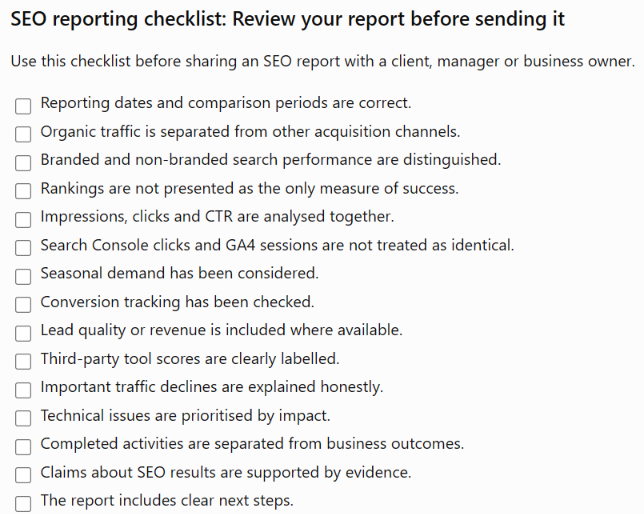
SEO reporting checklist: Review your report before sending it
Use this checklist before sharing an SEO report with a client, manager, or business owner.
- Reporting dates and comparison periods are correct.
- Organic traffic is separated from other acquisition channels.
- Branded and non-branded search performance are distinguished.
- Rankings are not presented as the only measure of success.
- Impressions, clicks, and CTR are analysed together.
- Search Console clicks and GA4 sessions are not treated as identical.
- Seasonal demand has been considered.
- Conversion tracking has been checked.
- Lead quality or revenue is included where available.
- Third-party tool scores are clearly labelled.
- Important traffic declines are explained honestly.
- Technical issues are prioritised by impact.
- Completed activities are separated from business outcomes.
- Claims about SEO results are supported by evidence.
- The report includes clear next steps.
Stop making SEO reports look good. Make them useful.
An SEO report is not a monthly competition to see how many green arrows, ranking improvements, or traffic charts you can fit into a PDF.
It is a way to explain what happened, what it means for the business, and what should happen next.
Sometimes the report will show growth. Sometimes it will show a decline. Sometimes you will discover that months of SEO activity have not produced the expected results.
That is part of the job.
After seven years in SEO, I would rather send a report that clearly explains why organic clicks declined and what we plan to do about it than send a beautiful PDF that hides the problem behind impressive-looking numbers.
A good SEO report does not try to prove that the SEO team is always right. It helps the business understand what is actually happening.

I am an SEO specialist with more than 7 years of hands-on experience in SEO, organic content marketing, technical SEO, and social media. I have an engineering degree, giving me an unusual combination of technical understanding and digital marketing expertise. Know more about me.